

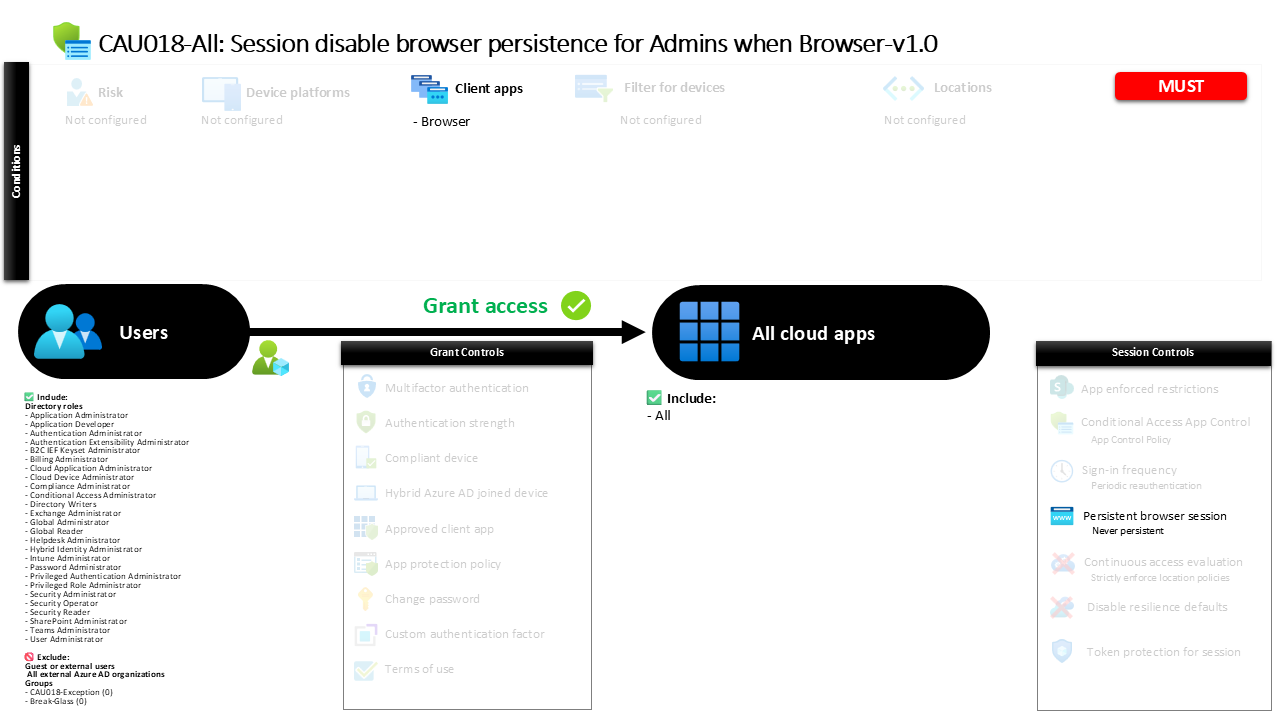
Conditional Access Browser Persistence Control CAU018-All Session disable browser persistence for Admins when Browser
Introduction
Conditional Access browser persistence is often overlooked in identity security discussions, yet it can quietly introduce significant risk. When privileged users sign in through a browser and the session is remembered by the device, the next person who opens that browser may gain immediate access to administrative capabilities without needing to authenticate again. In environments where administrators frequently access management portals from shared systems, jump hosts, or temporary workstations, this convenience can quickly turn into a security exposure.
This policy addresses that exact challenge by controlling how browser sessions behave when privileged identities access cloud services. Instead of allowing the browser to remember the administrative sign-in, the session is deliberately configured so that the browser cannot persist the authentication state. Every new session requires the administrator to authenticate again. The result is a more controlled sign-in experience that protects privileged access while still allowing administrators to perform their operational tasks through browser-based tools.
In practical terms, this design reflects a simple principle in modern identity security. Administrative access should never rely on remembered browser sessions.

This Policy in One Line
This Conditional Access policy ensures that administrative browser sessions are never remembered by the browser, preventing persistent sign-ins for privileged identities.
What This Conditional Access Policy Does
The design intention of this policy is to prevent administrative browser sessions from being stored by the browser after sign-in. In many cloud environments, browsers offer a “stay signed in” experience that allows authentication tokens to persist between sessions. While convenient for everyday productivity applications, this behavior introduces risk when administrative identities are involved.
This configuration specifically disables the ability for browsers to maintain persistent authentication sessions. When a privileged user signs in through a browser, the authentication session remains active only for the duration of that browser session. Once the browser is closed or the session ends, the authentication state disappears. The next time the administrator accesses a cloud service, the sign-in process begins again.
The security meaning of this configuration is straightforward. Administrative access should always require intentional authentication. By eliminating persistent browser sessions, the policy reduces the risk that unattended devices, shared workstations, or compromised browsers could provide silent access to administrative capabilities.
Who the Policy Applies To
The policy targets users who hold administrative roles in the identity platform. Instead of selecting individual users or groups, the configuration applies directly to privileged roles. This approach ensures that anyone who receives an administrative assignment automatically becomes subject to the policy.
From a security architecture perspective, targeting roles instead of accounts provides important operational advantages. Administrative responsibilities often change over time, particularly when organizations adopt privileged access management or just-in-time elevation. If the policy were tied to individual accounts, administrators could accidentally bypass the control when new privileged users are introduced. By targeting roles, the protection automatically follows the privilege rather than the person.
The configuration also excludes certain organizational groups. In many environments, such exclusion groups exist to support controlled exceptions. These exceptions may be used for break-glass accounts, emergency access identities, or carefully approved operational scenarios where administrators require temporary flexibility. The key idea is that exceptions are managed deliberately rather than through accidental misconfiguration.
What Apps and Services the Policy Protects
The policy is designed to protect access across all cloud applications that participate in identity-based authentication. Instead of focusing on a specific service or portal, the configuration applies the session control universally.
This design choice reflects the reality of modern administrative workflows. Privileged users rarely interact with a single application. They move between identity management portals, security consoles, infrastructure dashboards, and service management tools. Because all of these services rely on the same identity platform, the browser session itself becomes the critical security boundary.
By applying the session control broadly across applications, the policy ensures consistent protection regardless of which service the administrator accesses. Whether the administrator signs into a management portal, reviews audit logs, or performs configuration changes, the browser session cannot be remembered beyond its active lifetime.
The outcome is a predictable and consistent experience where administrative authentication is always tied to an active session.
Platforms, Devices, and Client Apps in Scope
This policy focuses specifically on browser-based sign-ins. Modern cloud administration often occurs through web portals rather than installed applications, making browsers one of the most common access paths for privileged users.
When the identity platform evaluates the policy during sign-in, it first determines how the administrator is accessing the service. If the authentication request originates from a browser, the policy becomes applicable and the session control is applied. Other client types fall outside the scope of this configuration because the control being enforced is specifically related to browser session behavior.
The emphasis on browser access is intentional. Browsers commonly run on shared administrative workstations, remote support systems, or temporary devices used during troubleshooting. Unlike managed applications that maintain controlled session handling, browsers can easily retain authentication state across sessions. By focusing on this access method, the policy targets one of the most common vectors where persistent authentication could unintentionally expose privileged access.
How Access Is Decided
During sign-in, the Conditional Access engine evaluates whether the request meets the conditions defined by the policy. The evaluation begins by identifying the user’s role assignments. If the user holds one of the administrative roles included in the policy, the identity platform continues the evaluation process.
Next, the system determines how the sign-in is occurring. If the request originates from a browser, the policy conditions are satisfied and the session control becomes active. At this point, the authentication itself proceeds normally. The policy does not block access or require additional authentication steps. Instead, it changes how the resulting session behaves.
Once authentication completes, the session control prevents the browser from storing persistent authentication. The browser is not allowed to remember the sign-in across sessions. From a security standpoint, the access decision is therefore not about allowing or denying access. It is about shaping the behavior of the session after authentication succeeds.
What the User Experience Looks Like During Sign-In
From the administrator’s perspective, the sign-in experience remains familiar. The user navigates to a cloud management portal and authenticates as usual. No additional prompts or challenges are introduced by this policy.
The difference becomes visible only after the administrator completes their work and leaves the session. If the browser is closed and reopened, the administrator will not find themselves already authenticated. Instead, the identity platform requires a new sign-in before access to services is granted again.
This behavior reinforces intentional access. Administrators must consciously authenticate each time they begin a new session. While this introduces a small amount of friction compared to persistent sessions, the trade-off is improved control over privileged access. In environments where administrators frequently switch between systems, this predictable authentication pattern helps ensure that privileged sessions are never silently reused.
Why This Policy Matters for Security and the Business
Privileged accounts represent some of the most sensitive identities in any organization. If an attacker gains access to an administrative session, the potential impact can extend across infrastructure, security controls, and data protection systems.
Persistent browser sessions increase the likelihood that privileged authentication could be reused unintentionally. For example, an administrator may sign in on a shared workstation, complete a task, and leave the browser open. If the browser retains the authentication state, the next person using that system could gain administrative access without needing credentials.
By preventing browser persistence, the organization ensures that administrative sessions disappear when the browser session ends. This dramatically reduces the chance that unattended devices or cached sessions could expose privileged capabilities. From a business perspective, the policy helps protect operational integrity while supporting the broader goal of minimizing identity-based attack surfaces.
Is This a Foundational or Must-Have Policy?
This policy is typically considered a foundational control for privileged identity protection. While it does not enforce authentication requirements or device compliance, it addresses a subtle but important aspect of session security.
Organizations often invest heavily in controls such as multi-factor authentication and privileged identity management. However, if browser sessions remain persistent, those protections can be undermined by simple session reuse. Preventing persistent sessions ensures that every administrative interaction begins with an intentional sign-in.
Because administrative activities frequently occur through web portals, controlling browser session behavior becomes an essential complement to other identity security mechanisms. When combined with strong authentication and least-privilege access, this type of session control strengthens the overall defensive posture around administrative identities.
Important Design Choices and Things to Notice
Several design decisions within this policy reflect thoughtful security architecture. The first is the decision to target administrative roles directly. This ensures that the protection follows the privilege assignment rather than individual accounts. When administrators change or new privileged roles are introduced, the policy continues to apply automatically.
Another important choice is the focus on browser access. Administrative tasks increasingly rely on web interfaces, making browser session behavior a critical area of control. By focusing on this access method, the policy addresses a common operational pattern without interfering with other administrative tools.
The presence of exclusion groups also indicates a deliberate exception strategy. Organizations often maintain tightly controlled groups for emergency or operational exceptions. This approach allows the security team to preserve the integrity of the policy while still accommodating rare scenarios where administrators may require temporary flexibility.
Conditional Access Design Principles Behind This Policy
At its core, this policy reflects the principle that privileged access should always be intentional and temporary. Persistent browser sessions contradict that principle by allowing authentication to silently continue beyond the original sign-in event.
The configuration therefore shifts the security boundary from the device to the active session. Instead of trusting the browser to manage authentication state responsibly, the identity platform enforces a rule that privileged sessions cannot persist. This ensures that each new administrative session begins with explicit authentication.
Another design principle present here is consistency. Because the session control applies across applications, administrators experience predictable behavior regardless of which portal they access. Consistency reduces confusion and helps reinforce good security habits among privileged users.
Final Thoughts
Controlling session behavior is a subtle but powerful part of identity security architecture. While authentication controls determine who can access systems, session controls influence how that access behaves over time.
This policy demonstrates how Conditional Access browser persistence controls can strengthen privileged identity protection without disrupting everyday administrative workflows. By preventing browsers from remembering administrative sessions, the organization ensures that privileged access always begins with deliberate authentication.
In modern cloud environments where administrators move quickly between systems and devices, that simple rule provides meaningful protection. Every administrative action begins with a conscious sign-in, and every session ends when the browser session ends. That is exactly how privileged access should behave.
