

Introduction
Conditional Access browser session control is designed to address a common challenge in modern cloud environments: users accessing business applications from devices that the organization does not fully trust. A user might sign in from a personal laptop, a temporary workstation, or a device that has not been enrolled into device management. While authentication may succeed, the organization still needs a way to safely handle that session.
This is where Conditional Access session controls become important. Instead of blocking access outright, organizations can apply additional security monitoring to the session itself. When a sign-in occurs under certain conditions, the session can be routed through Microsoft Defender for Cloud Apps so that activity is inspected and governed.
The policy explained in this article focuses specifically on browser access from devices that are not considered compliant or trusted. By steering those sessions through a monitoring layer, the organization gains visibility and control over how cloud applications are used without disrupting legitimate access. This reflects a modern Conditional Access strategy where identity verification and session protection work together.

This Policy in One Line
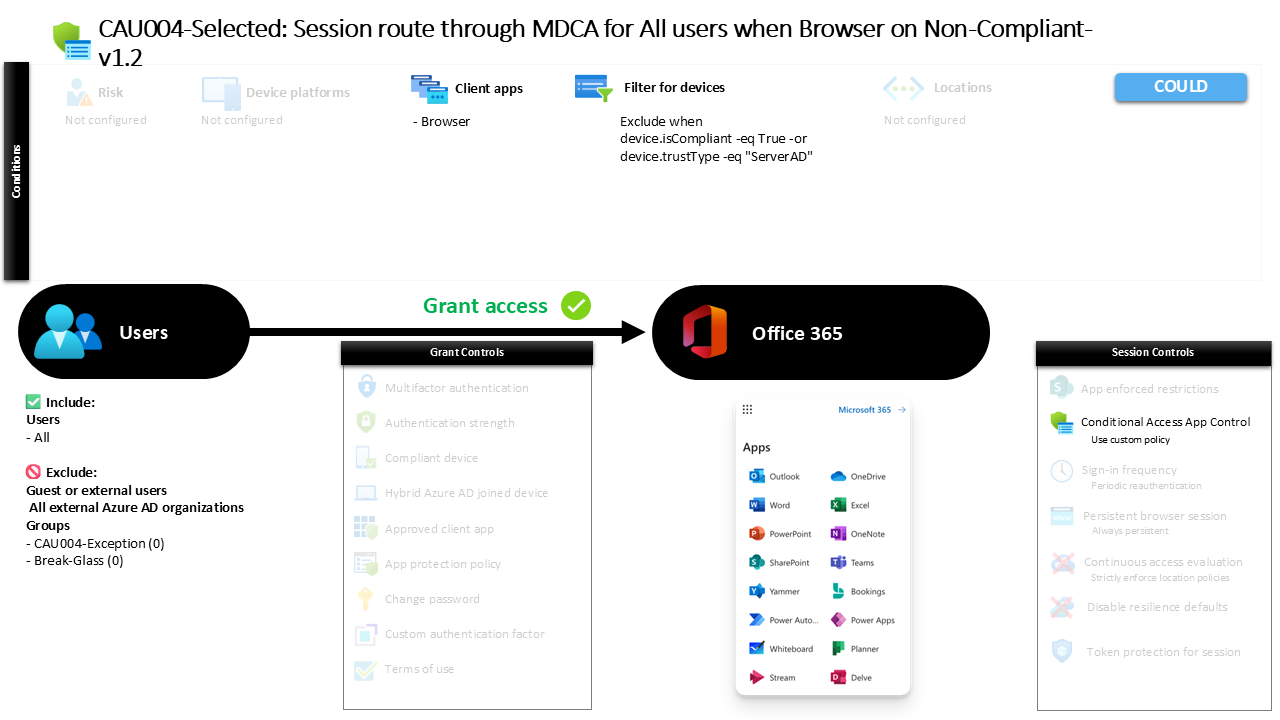
This Conditional Access policy routes browser sessions through Microsoft Defender for Cloud Apps when users access selected cloud services from devices that are not compliant or trusted.
What This Conditional Access Policy Does
The intention behind this Conditional Access design is to introduce additional monitoring when users access cloud applications from devices that the organization cannot fully validate. Instead of allowing a direct connection to the service, the session is redirected through Microsoft Defender for Cloud Apps where the activity can be observed and governed.
When a user signs in through a web browser, Conditional Access evaluates the device posture. If the device does not meet the criteria that define a compliant or trusted endpoint, the session is not blocked. Instead, it is routed through the Defender for Cloud Apps session control framework.
This approach allows organizations to apply session-level visibility and enforcement to potentially risky device scenarios. The user is still able to reach the application, but their interaction with the service now takes place through a monitored session.
From a Conditional Access architecture perspective, this represents a balanced design decision. Rather than forcing a strict deny rule for unmanaged devices, the organization chooses to allow access while maintaining oversight and control of the session activity.
Who the Policy Applies To
This policy targets all internal users within the tenant environment. Whenever a user signs in to the protected applications using a browser client, Conditional Access evaluates whether the policy conditions apply.
External identities such as guests, B2B collaboration users, and other external account types are not included within the scope of this policy. This indicates that the design focuses specifically on managing session behavior for internal workforce identities rather than external collaboration scenarios.
The configuration also excludes specific internal groups from the policy scope. In many Conditional Access designs, such exclusions are used to support operational flexibility. Organizations often maintain designated exception groups that allow security teams or administrators to temporarily bypass a control during troubleshooting, emergency access scenarios, or controlled rollout phases.
Using group-based exclusions instead of individual user exceptions is a recognized Conditional Access design pattern. It enables centralized management of exceptions and allows organizations to integrate approval processes or time-based membership changes without modifying the policy itself.
This structure helps keep the policy stable while still allowing controlled operational adjustments when necessary.
What Apps and Services the Policy Protects
The policy protects selected cloud services commonly accessed through the Microsoft identity platform. When users access these services through a browser session, Conditional Access evaluates the conditions defined in the policy before allowing the session to proceed.
Because the policy applies to browser-based access to these applications, it focuses specifically on interactive web sessions rather than background processes or non-interactive authentication flows.
From a security design perspective, this targeting ensures that the monitoring capability is applied precisely where unmanaged devices typically appear. Web browsers are frequently used on personal devices or temporary systems where device compliance or management status cannot be guaranteed.
By focusing the session control on these application interactions, the organization ensures that potentially sensitive activity occurring in the browser is evaluated within a monitored environment.
This selective targeting also aligns with a common Conditional Access strategy where browser-based sessions are treated differently from managed desktop or mobile client connections.
Platforms, Devices, and Client Apps in Scope
This policy evaluates sign-ins that originate from web browsers. When a user authenticates through a browser-based interface, Conditional Access checks whether the device meets the trust criteria defined within the configuration.
The device evaluation logic excludes endpoints that are recognized as compliant or that are joined to the organization’s on-premises Active Directory environment. Devices that fall into those trusted categories are not subject to the session routing defined in this policy.
As a result, the policy primarily affects devices that are not compliant and not recognized as trusted organizational endpoints. These devices may include personal computers, unmanaged laptops, or other systems that do not participate in device management or device trust frameworks.
This device filtering strategy reflects a practical Conditional Access design principle. Trusted and managed devices are typically granted a more direct experience, while unmanaged devices are subject to additional safeguards.
The browser client requirement further narrows the policy scope to scenarios where users interact with applications through a web interface rather than through installed applications or background clients.
How Access Is Decided
When a sign-in occurs, Conditional Access evaluates several aspects of the authentication request. In this policy, the most important factors are the client type and the device characteristics associated with the session.
The evaluation begins by confirming that the user is accessing the application through a web browser. If the connection is initiated from a different client type, the policy conditions are not triggered.
Next, Conditional Access checks whether the device is considered compliant or trusted. If the device satisfies those criteria, the session proceeds normally without additional intervention.
If the device does not meet those trust conditions, the session is not denied. Instead, the connection is redirected through Microsoft Defender for Cloud Apps using session control capabilities.
This decision process allows Conditional Access to differentiate between trusted device scenarios and higher-risk device scenarios. Rather than enforcing a strict access barrier, the policy introduces an adaptive security layer that monitors activity only when necessary.
What the User Experience Looks Like During Sign-In
From the user’s perspective, the sign-in process may appear largely familiar. The user navigates to the cloud application, enters their credentials, and completes the authentication process.
Behind the scenes, Conditional Access evaluates the session. When the device is identified as non-compliant or untrusted, the session is transparently routed through Microsoft Defender for Cloud Apps.
The user continues interacting with the application through their browser, but the session now passes through a security monitoring layer. This allows the organization to observe activity and apply session governance policies where appropriate.
Because the redirection occurs after authentication, the overall experience remains smooth for the user. They gain access to the application while the organization maintains visibility into how that access is used.
This type of experience reflects the broader goal of Conditional Access: enforcing security controls while minimizing disruption to legitimate work.
Why This Policy Matters for Security and the Business
Organizations increasingly face situations where employees access corporate services from devices outside traditional management boundaries. Remote work, personal devices, and contractor environments make unmanaged endpoints a common reality.
Blocking access entirely from those devices can disrupt productivity. At the same time, allowing unrestricted sessions can introduce unnecessary risk.
This policy addresses that balance. By routing browser sessions through Microsoft Defender for Cloud Apps when devices are not trusted, the organization maintains visibility into potentially sensitive activity.
Session monitoring provides an additional security layer that can help detect suspicious behavior, unusual data access patterns, or policy violations occurring during the session.
For the business, this design allows employees to remain productive regardless of device location while still enforcing protective oversight where device trust cannot be established.
Is This a Foundational or Must-Have Policy?
This type of policy is typically considered part of an advanced Conditional Access architecture rather than a basic baseline control.
Foundational policies often focus on enforcing strong authentication or blocking legacy protocols. Session routing policies, by contrast, extend security deeper into the application interaction itself.
Organizations that implement session monitoring through Microsoft Defender for Cloud Apps are usually moving toward a mature identity-driven security model. They recognize that identity verification alone does not fully address the risks associated with unmanaged devices.
Instead, they combine authentication decisions with session visibility. This layered approach aligns closely with modern Zero Trust principles, where every access scenario is evaluated continuously rather than only at sign-in.
Important Design Choices and Things to Notice
One of the most notable aspects of this configuration is the decision to allow access rather than block it when devices are not compliant. The policy focuses on controlling the session rather than preventing the connection.
This reflects a practical design strategy. In many environments, unmanaged devices are unavoidable, especially in remote work or partner collaboration scenarios.
Another interesting design element is the exclusion of trusted devices. Devices that are compliant or recognized as trusted endpoints are intentionally allowed to bypass the session routing mechanism.
This ensures that managed endpoints maintain a smooth and direct user experience while additional controls are applied only where risk is higher.
The use of group-based exclusions also indicates that the organization anticipates operational scenarios where temporary policy exceptions may be required.
Conditional Access Design Principles Behind This Policy
Several Conditional Access design principles are visible within this configuration. The first is risk-based differentiation. The policy distinguishes between trusted and untrusted devices and adapts the security response accordingly.
Another principle is layered defense. Instead of relying solely on authentication controls, the design introduces session monitoring as an additional security layer.
Selective targeting is also evident. The policy applies specifically to browser-based access scenarios, which are commonly associated with unmanaged device usage.
Finally, the configuration demonstrates an emphasis on visibility rather than restriction. By routing sessions through Microsoft Defender for Cloud Apps, the organization gains insight into user behavior without immediately denying access.
Together, these design decisions illustrate how Conditional Access can support both security oversight and operational flexibility.
Final Thoughts
Conditional Access browser session control provides a powerful mechanism for managing access from devices that cannot be fully trusted. Instead of forcing an all-or-nothing access decision, organizations can introduce session-level monitoring that protects sensitive activity while keeping users productive.
This policy represents a thoughtful implementation of that approach. Trusted devices receive a direct experience, while browser sessions from non-compliant devices are routed through a security inspection layer.
By combining device evaluation with session governance, the organization strengthens its overall identity security posture without creating unnecessary barriers for users.
In modern cloud environments where device trust varies widely, policies like this help ensure that access remains both secure and practical.
