

Conditional Access Block Access Policy Explained CAU011-All: Block access for All users except licensed when Browser and Modern Auth Clients
Introduction
Conditional Access block access policy designs often begin with a simple security question: what should happen when an identity attempts to access cloud resources without meeting the organization’s eligibility requirements? In many environments, identities exist that should not interact with business applications at all. These could be unlicensed accounts, dormant identities, or accounts created for administrative processes that should never initiate normal user sign-ins.
Conditional Access block access policy controls are frequently used to create this protective boundary. Instead of trying to predict every risky scenario, security architects can define a rule that simply prevents access entirely unless a user meets specific organizational conditions.
In this design, access to cloud services is denied when a user attempts to sign in through a web browser or modern authentication client. Because those sign-in paths represent the majority of interactive authentication activity, the policy creates a broad enforcement point that stops unwanted access attempts before they can reach applications.
The result is a clear and predictable security behavior: if an identity is not explicitly allowed to operate in the environment, Conditional Access ensures that access is stopped immediately.

This Policy in One Line
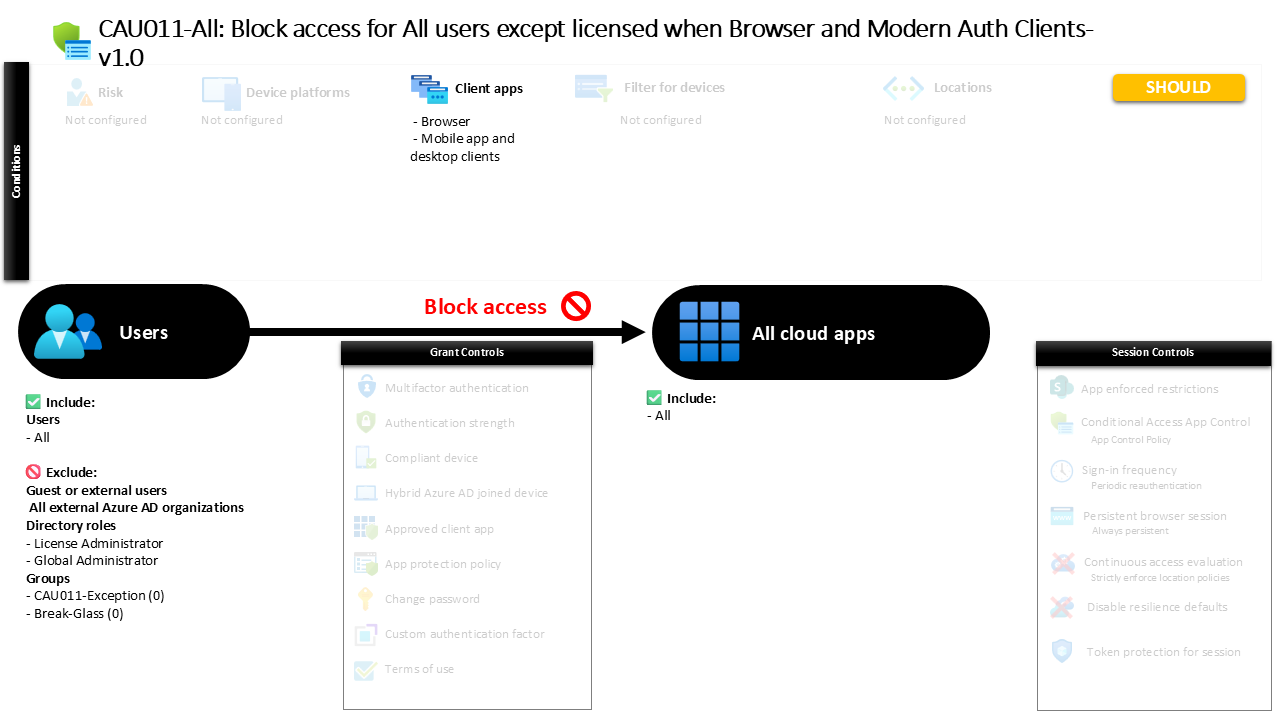
A Conditional Access block access policy denies sign-in attempts to all cloud applications when users authenticate through browsers or modern authentication clients, unless they are explicitly excluded.
What This Conditional Access Policy Does
The intention of this policy is straightforward: it establishes a tenant-wide access barrier that prevents sign-ins from identities that should not be interacting with business applications.
Conditional Access evaluates the rule whenever a sign-in attempt occurs through a browser session or through applications that use modern authentication. These authentication methods represent the most common ways users interact with Microsoft cloud services, including web portals, desktop productivity apps, and mobile clients.
When the policy evaluates a sign-in that matches these conditions, the access decision is simple. Instead of requesting additional authentication or verifying device posture, the policy directly denies the attempt. No further interaction occurs between the user and the application.
From a security architecture perspective, this type of rule acts as a defensive perimeter inside the identity layer. It ensures that certain identities cannot reach the stage where application access would normally be granted.
Rather than reacting to suspicious activity, the policy removes access possibilities entirely, which is often the safest approach for identities that should not participate in normal sign-in flows.
Who the Policy Applies To
The policy targets all internal identities in the directory, meaning the evaluation applies broadly across the tenant whenever those identities attempt to authenticate.
External guest identities are not included in the scope of the rule. This separation allows organizations to manage external collaboration through separate policies that focus on partner access, external sharing, or cross-tenant identity behavior.
In addition to guest exclusions, certain administrative roles are excluded from the enforcement scope. Security architects commonly apply these role exclusions to ensure that operational administrators retain the ability to manage the environment even if other Conditional Access rules create restrictive access paths.
The configuration also excludes specific directory groups. Organizations frequently use such groups to support controlled exception handling. Instead of modifying the policy itself, identities can be temporarily placed in an exception group through an approved process. Once the exception period ends, the identity is removed and the standard access rules automatically apply again.
This approach aligns with mature Conditional Access design practices where exception management is handled operationally rather than through permanent policy changes.
What Apps and Services the Policy Protects
The policy protects all cloud applications integrated with Microsoft Entra authentication.
Whenever an identity attempts to sign in to any cloud service connected to the tenant’s identity platform, the Conditional Access engine evaluates the request against this rule. Because the scope includes all applications, the protection is consistent across productivity services, administrative portals, and any additional cloud applications that rely on Entra ID authentication.
This design ensures there are no gaps between applications. If a blocked identity attempts to sign in through a browser or modern authentication client, the same access decision is applied regardless of which service the user is targeting.
From a security standpoint, this consistency is important. Attackers often move between applications when probing environments for weaknesses. By applying the same blocking logic across all applications, the policy removes opportunities for inconsistent access behavior.
The outcome is a predictable enforcement model where identities that should not interact with the tenant cannot reach any application entry point.
Platforms, Devices, and Client Apps in Scope
The policy focuses on two authentication client categories: browser sessions and modern authentication clients used by mobile and desktop applications.
When a user attempts to access cloud services through a web browser, the sign-in request falls directly within the policy scope. This includes common access scenarios such as visiting web portals, accessing productivity services through the browser, or opening administrative portals.
The policy also evaluates sign-ins initiated by applications that rely on modern authentication protocols. These include desktop productivity clients and mobile applications that authenticate through Microsoft Entra ID.
By targeting these client types, the policy captures the most common authentication paths used in everyday cloud access. Whether a user opens a browser to access services or launches a mobile or desktop application, the sign-in event triggers the same Conditional Access evaluation.
The design ensures that blocked identities cannot bypass restrictions simply by changing the method they use to sign in.
How Access Is Decided
When a sign-in attempt occurs, Conditional Access begins by evaluating the identity against the policy scope.
First, the system determines whether the identity falls within the group of users targeted by the policy. If the identity belongs to one of the excluded categories, the rule does not apply and the sign-in continues through the normal authentication process.
If the identity remains within scope, Conditional Access then checks the authentication client type. When the sign-in originates from a browser or a modern authentication client, the request satisfies the conditions defined in the policy.
At that moment the access decision is enforced. Instead of presenting authentication challenges or requesting additional verification steps, the system denies access entirely.
The authentication process stops before the application session begins, which ensures the user never reaches the application environment.
This enforcement pattern reflects a clear security principle: when access should not occur, the safest outcome is to prevent it completely.
What the User Experience Looks Like During Sign-In
From the user perspective, the experience is immediate and unambiguous.
A user attempting to sign in through a browser or supported client application initiates the normal authentication process. Credentials may be entered as usual, but once Conditional Access evaluates the sign-in, the policy denies the request.
Instead of receiving access to the application, the user is presented with a message indicating that sign-in is blocked. Because the policy enforces a direct denial rather than an authentication requirement, there are no additional prompts or remediation steps.
For administrators and security teams, this behavior is useful because it clearly communicates that the identity is not permitted to access cloud services under the current configuration.
It also prevents repeated authentication attempts from progressing deeper into the environment, which reduces exposure to potential misuse.
Why This Policy Matters for Security and the Business
Identity environments often contain accounts that exist for operational purposes but should never be used for normal application access. Without explicit controls, these identities could potentially authenticate and interact with cloud services.
A Conditional Access block access policy provides a clean and reliable way to prevent that scenario.
By denying authentication attempts at the identity layer, the organization removes the possibility that unintended accounts interact with sensitive applications or data. This reduces the attack surface and simplifies access governance.
The business impact is equally important. Security teams gain confidence that only properly authorized and licensed identities can interact with cloud services, while operational processes remain manageable through controlled exception groups.
This balance between strict enforcement and controlled flexibility is a hallmark of mature Conditional Access architecture.
Is This a Foundational or Must-Have Policy?
Policies that enforce direct access denial are often considered foundational building blocks in Conditional Access design.
While many policies focus on strengthening authentication through additional verification steps, block policies serve a different purpose. They define the identities that should never reach the authentication stage in the first place.
In practice, these rules are frequently used to enforce licensing boundaries, prevent unused accounts from authenticating, or stop identities created for operational tasks from interacting with applications.
Because they operate across all applications and major authentication methods, block policies provide a powerful and predictable security safeguard.
When implemented thoughtfully alongside other Conditional Access controls, they help establish a strong baseline that supports the broader Zero Trust model.
Important Design Choices and Things to Notice
One notable design decision in this policy is the broad application scope. By applying the rule across all cloud applications, the configuration avoids the complexity of maintaining separate blocking logic for individual services.
Another important element is the focus on authentication client types rather than device conditions. This means the policy evaluates sign-ins based on how the authentication occurs, not on the state of the device initiating the request.
The use of exclusion groups also reflects a practical operational model. Instead of weakening the policy itself when exceptions are required, administrators can temporarily place identities into an approved group. This keeps the policy stable while still allowing controlled flexibility.
Finally, excluding administrative roles ensures that the environment remains manageable even if restrictive access controls are applied broadly.
Together, these design choices illustrate a balance between strong access control and operational resilience.
Conditional Access Design Principles Behind This Policy
Several Conditional Access design principles are visible in this configuration.
First is the principle of deterministic enforcement. When the policy conditions are met, the result is always the same: access is denied. There are no intermediate steps or alternative outcomes.
Second is the principle of tenant-wide consistency. By targeting all applications and common authentication paths, the policy eliminates inconsistencies that attackers could exploit.
Third is operational separation. Instead of embedding exception logic inside the policy itself, the design relies on exclusion groups to manage temporary access requirements.
Finally, the policy supports the broader Zero Trust philosophy. Identities must explicitly qualify for access, and when they do not, the safest action is to stop the sign-in before it reaches any application resources.
These principles ensure the policy behaves predictably and integrates cleanly into a larger Conditional Access architecture.
Final Thoughts
Conditional Access policies are often associated with authentication challenges such as multi-factor verification or device compliance checks. However, some of the most powerful controls in the platform are the simplest ones.
A Conditional Access block access policy demonstrates this principle clearly. By defining a scenario where authentication must never succeed, the organization removes entire categories of potential risk.
When combined with well-designed exception management and complementary access policies, this type of rule becomes a reliable safeguard for the identity environment.
Rather than relying solely on reactive security measures, the policy establishes a proactive boundary that ensures only authorized identities can interact with the organization’s cloud services.
