

Conditional Access MFA for Guests Guide CAU001A-Windows Azure Active Directory Grant Require MFA for guests when Browser and Modern Auth Clients
Introduction
Conditional Access MFA for guests addresses a challenge that nearly every organization faces today. External collaboration is essential for modern business, yet every guest account represents a potential entry point into the environment. Partners, vendors, consultants, and service providers often access shared resources using identities that originate outside the organization’s own directory. Without additional verification, those identities rely entirely on the security posture of another tenant.
Conditional Access provides a way to add a verification layer before access is granted. In this design, guest and external users must complete multi-factor authentication when signing in to Microsoft Entra ID through browser sessions or modern authentication clients. The goal is straightforward: verify the identity behind the sign-in before directory resources become accessible.
From a security architecture perspective, this approach recognizes a simple truth. When identities come from outside the organization, the safest assumption is that additional verification should always be required.

This Policy in One Line
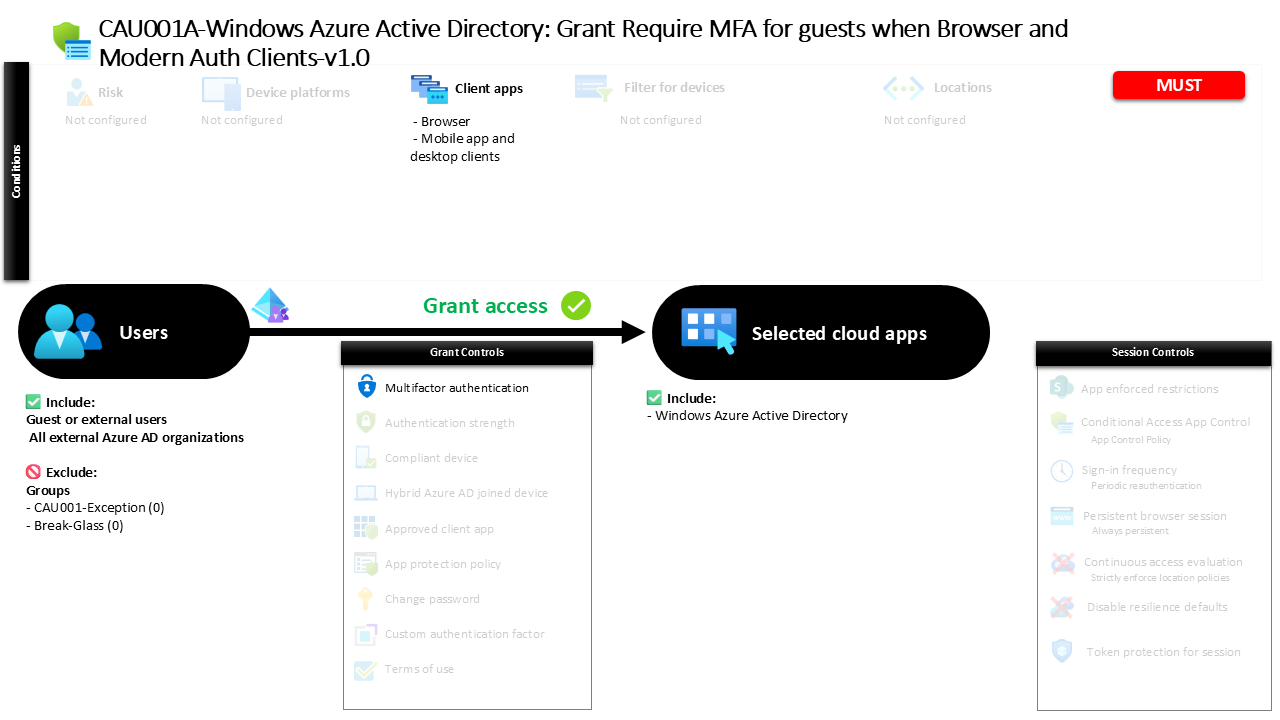
This Conditional Access policy requires multi-factor authentication for guest and external users when they access Microsoft Entra ID through browsers or modern authentication clients.
What This Conditional Access Policy Does
The intention behind this Conditional Access policy is to ensure that every external identity accessing directory resources proves its legitimacy through strong authentication. When a guest user attempts to sign in, Conditional Access evaluates several elements of the authentication request before deciding whether access can proceed.
In this design, the policy specifically evaluates sign-ins performed through browser sessions and through modern authentication clients such as mobile applications or desktop applications. These are the most common ways external users interact with shared environments.
When the policy conditions match the incoming sign-in, the user must complete multi-factor authentication before the session is allowed to continue. The authentication process adds a second verification step beyond the password, typically requiring confirmation through a registered authentication method.
The result is a layered authentication process where external identities cannot rely solely on a single factor to gain access. This strengthens the security boundary between the organization and its external collaborators while still allowing productive collaboration.
Who the Policy Applies To
This Conditional Access policy focuses specifically on guest and external identities. These identities represent users who authenticate from outside the organization’s own tenant but still receive permission to access certain services or directory-based resources.
The policy includes multiple external identity types. These may include collaboration guests, external members participating in shared environments, direct connection users from partner tenants, service provider accounts, and other external identities recognized by Microsoft Entra ID. By targeting the full range of external user categories, the policy ensures consistent authentication behavior across all forms of guest collaboration.
Within the configuration, certain groups are excluded from the policy scope. Organizations commonly use such exclusion groups to manage controlled exceptions. For example, an identity governance process might temporarily add a user to an exclusion group when troubleshooting sign-in issues or when a specific operational scenario requires an alternative authentication flow.
Using group-based exclusions allows security teams to handle exceptions in a structured and auditable way without weakening the overall Conditional Access architecture.
What Apps and Services the Policy Protects
The policy protects access to Microsoft Entra ID directory resources. These resources form the identity backbone of the cloud environment and play a central role in authentication and authorization decisions across many services.
When a guest user signs in to interact with directory-based services, the authentication request passes through Microsoft Entra ID. At that moment, Conditional Access evaluates whether the session meets the defined policy conditions.
Protecting directory access is an important design choice. By enforcing authentication controls at the identity platform itself, organizations apply security verification at the earliest possible stage of the access process. This ensures that identity validation occurs before a session can interact with directory functions or services that rely on Microsoft Entra ID authentication.
From a security architecture standpoint, enforcing Conditional Access controls at the identity layer provides broad protection while minimizing complexity. The identity platform becomes the central enforcement point for verifying external user access.
Platforms, Devices, and Client Apps in Scope
This policy evaluates sign-ins based on the type of client application initiating the authentication request. Specifically, it applies to browser sessions and modern authentication clients used on desktop or mobile devices.
Browser authentication represents one of the most common access methods for guest users. External collaborators frequently access shared resources through web portals or cloud-based applications. By evaluating browser-based sign-ins, Conditional Access ensures that these web sessions require additional verification before access proceeds.
Modern authentication clients represent the second access path covered by the policy. These include mobile applications and desktop clients that authenticate directly against Microsoft Entra ID using modern authentication protocols.
By covering both browser sessions and modern authentication clients, the policy captures the majority of interactive access scenarios used by guest users. This design ensures that external collaboration cannot bypass strong authentication simply by using a different client application.
How Access Is Decided
Conditional Access evaluates each sign-in attempt in real time. When a guest or external user attempts to authenticate, Microsoft Entra ID examines whether the conditions defined in the policy apply to the request.
The system evaluates three primary elements. First, the identity type must match the targeted external user categories. Second, the application being accessed must fall within the protected directory resources. Third, the client application must match either a browser session or a modern authentication client.
When these elements align, Conditional Access triggers the grant control defined in the policy. In this configuration, the required control is multi-factor authentication.
The authentication flow pauses until the user successfully completes the additional verification step. Only after that verification succeeds will Microsoft Entra ID allow the authentication session to continue. This evaluation process ensures that strong authentication is enforced consistently whenever the policy conditions are met.
What the User Experience Looks Like During Sign-In
From the guest user’s perspective, the authentication process remains familiar but includes an additional verification step. The user begins by signing in with their existing credentials from their home identity provider.
Once the initial authentication completes, Microsoft Entra ID evaluates the Conditional Access policy. Because the user is identified as an external identity accessing directory resources through a browser or modern client, the policy requirements apply.
At this stage the sign-in experience pauses and prompts the user to complete multi-factor authentication. The user confirms their identity using a registered authentication method such as a mobile authenticator notification or another configured factor.
After the verification succeeds, the sign-in process resumes and the user gains access to the requested resource. From a usability perspective, the process adds only a small additional step while significantly improving identity assurance.
Why This Policy Matters for Security and the Business
External collaboration introduces risk because organizations do not control the identity lifecycle of guest accounts in the same way they control internal identities. Password policies, device security posture, and identity governance may vary significantly between tenants.
Conditional Access MFA for guests reduces that uncertainty. By requiring multi-factor authentication during sign-in, the organization ensures that an additional layer of identity verification takes place regardless of the external tenant’s own security configuration.
This approach protects the organization against credential compromise scenarios involving external identities. Even if a password is exposed or reused elsewhere, the additional authentication factor prevents unauthorized access.
From a business perspective, the policy supports safe collaboration. Partners and vendors can continue accessing shared resources, but access is validated through stronger authentication controls.
Is This a Foundational or Must-Have Policy?
A policy enforcing multi-factor authentication for guest users is widely considered a foundational Conditional Access control. External identities represent a distinct security boundary because they originate outside the organization’s identity governance framework.
Requiring strong authentication for these identities ensures that external collaboration does not weaken the organization’s identity security posture. It establishes a consistent expectation that every guest session must pass through additional identity verification before gaining access to protected resources.
In many Conditional Access architectures, guest MFA enforcement appears early in the policy design sequence. It forms part of the baseline protection model that organizations apply before implementing more advanced controls such as device compliance or session restrictions.
By securing external identities first, organizations build a stronger identity perimeter around the Microsoft Entra environment.
Important Design Choices and Things to Notice
Several important design decisions are visible in this Conditional Access configuration. One notable element is the broad coverage of external identity categories. By including multiple guest and collaboration identity types, the policy ensures consistent authentication enforcement regardless of how an external identity was created.
Another design choice is the focus on modern authentication clients and browser sessions. These access paths represent the majority of interactive sign-in scenarios used by external collaborators.
The use of group-based exclusions also reflects a practical operational approach. Security teams often need a controlled mechanism for managing exceptions without modifying the policy itself. Group-based exclusions allow those exceptions to be handled through identity governance processes rather than through direct policy changes.
Together, these design elements create a policy that balances strong security enforcement with operational flexibility.
Conditional Access Design Principles Behind This Policy
This policy reflects several core principles of Conditional Access architecture. The first principle is identity verification before access. By requiring multi-factor authentication, the policy ensures that the identity behind each external sign-in is validated beyond a single credential.
The second principle is centralized enforcement. Rather than applying authentication requirements within individual applications, the policy enforces identity verification at the Microsoft Entra ID platform level.
A third principle is consistent control for external identities. Guest users often enter the environment through multiple collaboration mechanisms. Applying Conditional Access uniformly across those identity types ensures that security does not depend on how the account was created.
These principles together illustrate how Conditional Access can create a strong identity boundary while still supporting modern collaboration models.
Final Thoughts
External collaboration is essential for modern organizations, but it must be secured thoughtfully. Guest identities introduce an external trust boundary that organizations cannot fully control.
Conditional Access MFA for guests provides a practical and effective safeguard. By requiring additional authentication verification whenever external users access directory resources through browsers or modern clients, the policy strengthens the organization’s identity security posture.
The design demonstrates how Conditional Access can balance usability and protection. External users still gain the access they need, but each session is verified through a stronger authentication process.
When implemented as part of a broader Conditional Access architecture, this type of policy plays a critical role in securing identity-driven access across Microsoft Entra environments.
