

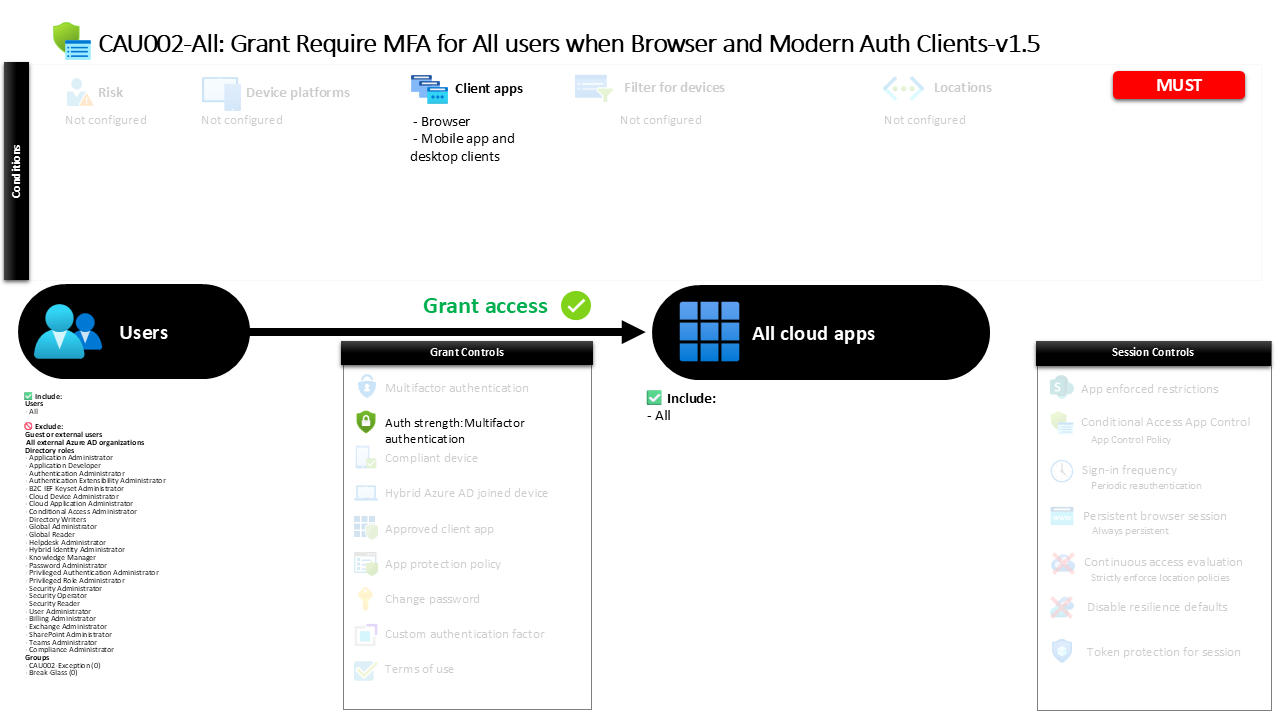
Conditional Access Policy Requiring MFA for All Apps CAU002-All Grant Require MFA for All users when Browser and Modern Auth Clients
Introduction
A common security challenge in modern cloud environments is ensuring that user credentials alone are not enough to access business applications. Passwords can be stolen, reused across services, or exposed through phishing attacks. A strong Conditional Access policy addresses this risk by requiring an additional layer of identity verification whenever users attempt to access applications.
The Conditional Access policy described in this article focuses on one of the most widely adopted identity protection strategies in Microsoft Entra ID: enforcing multifactor authentication during application sign-in. The design ensures that users accessing applications through browsers or modern authentication clients must confirm their identity using more than a password.
By applying multifactor authentication broadly across applications and users, this policy helps organizations reduce the risk of credential-based attacks while maintaining compatibility with modern authentication technologies. The result is a clear, consistent security posture that strengthens identity protection across the entire cloud application landscape.

This Policy in One Line
This Conditional Access policy requires multifactor authentication when users sign in to applications using browsers or modern authentication clients.
What This Conditional Access Policy Does
The primary intention behind this Conditional Access policy is to introduce strong identity verification whenever users access applications through modern authentication methods. Instead of relying solely on passwords, the policy requires users to complete multifactor authentication before access is granted.
Conditional Access evaluates each sign-in event by examining the client application used during authentication. When the sign-in originates from a browser or from a modern application client such as a desktop or mobile application that uses modern authentication protocols, the policy becomes relevant. Once this condition is met, the identity platform requires the user to complete an authentication process that satisfies multifactor authentication requirements.
From a security architecture perspective, this approach ensures that the most common authentication paths into Microsoft cloud services are protected with stronger identity verification. Browsers and modern application clients represent the primary access methods for productivity tools, collaboration services, and cloud workloads. Requiring multifactor authentication in these scenarios significantly reduces the likelihood that stolen passwords alone can be used to gain access.
Who the Policy Applies To
The scope of this Conditional Access policy includes the entire internal user population within the tenant. By targeting all users, the design reflects a security principle commonly used in Zero Trust environments: strong authentication should be applied consistently across the organization rather than limited to specific departments or roles.
At the same time, certain identities are intentionally excluded from the policy scope. Several administrative role categories are excluded from the enforcement scope, which is a common Conditional Access design pattern used to prevent accidental administrative lockout scenarios. During the early phases of policy deployment or when troubleshooting authentication issues, maintaining controlled access for privileged roles can help administrators recover from configuration mistakes without losing access to the environment.
In addition, the policy excludes external identities such as guest users and other external collaboration accounts. These identities often authenticate through external identity providers or follow different trust models, so they are frequently governed by separate Conditional Access strategies. The configuration also contains exclusion groups, which organizations typically use to manage temporary or controlled exceptions through approval processes or time-limited access scenarios.
What Apps and Services the Policy Protects
This Conditional Access policy is intentionally broad in the applications it protects. Instead of targeting a specific workload or service, the policy applies to all cloud applications registered within the tenant.
When Conditional Access evaluates a sign-in attempt, it checks whether the requested application falls within the scope of the policy. Because the configuration includes all applications, the policy becomes relevant regardless of which service the user is attempting to access. Whether the sign-in is directed at collaboration tools, business applications, or custom enterprise integrations, the authentication requirement remains the same.
From a security design standpoint, this approach removes ambiguity from authentication requirements. Users do not experience different authentication expectations depending on the application they access. Instead, the identity platform enforces a uniform authentication baseline across the tenant, ensuring that strong identity verification protects every supported service.
Platforms, Devices, and Client Apps in Scope
The evaluation logic of this Conditional Access policy focuses specifically on the type of client used during authentication. Rather than filtering by device platform or operating system, the policy evaluates the client application category.
Two client application types fall within scope. The first is browser-based access. When a user signs in through a web browser to access a cloud service, Conditional Access recognizes this authentication path and applies the multifactor authentication requirement. Browsers represent one of the most common entry points into cloud workloads, making them a critical focus for identity protection.
The second client category includes modern mobile and desktop applications that authenticate using modern authentication protocols. These applications use secure authentication frameworks that integrate directly with the Microsoft identity platform. By targeting both browsers and modern authentication clients, the policy effectively covers the majority of real-world authentication scenarios encountered in Microsoft cloud environments.
How Access Is Decided
When a user initiates a sign-in to an application, Microsoft Entra ID evaluates the authentication request against all applicable Conditional Access policies. For this Conditional Access policy, the decision process begins by checking whether the user falls within the targeted population and whether the client application matches the defined categories.
If both conditions apply, the identity platform evaluates the grant requirements defined in the policy. In this configuration, the required control is an authentication strength that satisfies multifactor authentication. This means that the sign-in must involve more than a single authentication factor.
The identity platform supports multiple combinations that satisfy this requirement. These combinations can include hardware security keys, authenticator push notifications, certificate-based authentication, temporary access pass scenarios, or combinations of passwords with additional verification methods. As long as the authentication method used satisfies multifactor authentication requirements, access to the application is granted.
What the User Experience Looks Like During Sign-In
From the user’s perspective, this Conditional Access policy introduces an additional identity verification step during sign-in. When a user enters their primary credentials while accessing an application through a browser or modern client, the authentication process pauses before access is granted.
At this stage, the user is prompted to complete a multifactor authentication challenge. The exact experience depends on the authentication methods registered for the user. In many environments, the user might receive a push notification through an authenticator application on their mobile device. In other cases, they may be prompted to use a hardware security key, provide a verification code, or approve the sign-in through another registered authentication method.
Once the multifactor authentication challenge is successfully completed, the sign-in process resumes and access to the application is granted. This additional step may only take a few seconds for the user, but it provides a significant increase in protection against unauthorized access attempts.
Why This Policy Matters for Security and the Business
Credential theft remains one of the most common entry points for attackers targeting cloud environments. Password-based authentication alone is vulnerable to phishing campaigns, password spraying attacks, and credential reuse across compromised services.
By enforcing multifactor authentication across all applications accessed through browsers and modern authentication clients, this Conditional Access policy directly addresses that risk. Even if an attacker successfully obtains a user’s password, they would still need to satisfy the additional authentication factor required by the policy.
For organizations, the benefit extends beyond technical security controls. Strong authentication reduces the likelihood of account compromise, protects sensitive business data, and improves compliance with modern security frameworks that require multifactor authentication as a baseline control.
Is This a Foundational or Must-Have Policy?
This Conditional Access policy represents a foundational security control within a Microsoft Entra ID environment. Requiring multifactor authentication during application sign-in is widely recognized as one of the most effective defenses against credential-based attacks.
Many organizations treat this type of policy as a baseline identity protection mechanism. Once implemented, it becomes part of the standard authentication posture that applies across the environment. Other Conditional Access policies may build upon this foundation by introducing device compliance requirements, risk-based authentication, or session management controls.
Important Design Choices and Things to Notice
One important design decision in this policy is the use of a strong authentication requirement rather than relying solely on individual authentication methods. By defining an authentication strength that satisfies multifactor authentication, the policy allows flexibility in how users authenticate while still enforcing a consistent security outcome.
Another notable aspect is the broad application scope. Instead of focusing on a subset of services, the policy applies the authentication requirement across all applications. This approach eliminates gaps that might otherwise exist if some services required stronger authentication while others did not.
Finally, the presence of exclusion groups reflects a practical Conditional Access design strategy. These groups allow organizations to manage temporary exceptions when necessary while still maintaining a strong default security posture for the majority of users.
Conditional Access Design Principles Behind This Policy
Several key Conditional Access design principles are reflected in this policy configuration. The first is the concept of consistent identity verification. By enforcing multifactor authentication across common authentication paths, the policy ensures that identity verification remains strong regardless of the application accessed.
The second principle is broad coverage. Applying authentication requirements across all applications ensures that no service becomes an unintended weak point in the security architecture. Attackers often look for the least protected entry point, and broad policy scope reduces those opportunities.
Finally, the policy supports operational resilience by allowing structured exclusions. Conditional Access designs must balance security with recoverability. Controlled exclusions ensure that administrators retain the ability to manage and troubleshoot the environment without compromising the overall security posture.
Final Thoughts
Strong authentication is one of the most important defenses available in modern identity security. A well-designed Conditional Access policy ensures that passwords alone cannot grant access to business applications.
By requiring multifactor authentication for browser and modern client sign-ins across all applications, this Conditional Access policy establishes a consistent security baseline for user authentication. The result is a practical, scalable identity protection mechanism that strengthens access control across the Microsoft cloud ecosystem.
