

Conditional Access Sign-In Frequency for Admins CAU017-All: Session set Sign-in Frequency for Admins when Browser
Introduction
Conditional Access sign-in frequency policies exist to solve a subtle but serious security challenge: administrative sessions that stay active for too long. Administrators often access powerful portals and management interfaces through a browser, and once authenticated those sessions may remain valid for extended periods. If a workstation is left unlocked, a browser session persists, or a device becomes compromised, that open session can quietly become an entry point for privilege misuse.
This policy addresses that risk by controlling how long administrative browser sessions remain valid before the identity must be verified again. Instead of relying on indefinite session persistence, Conditional Access forces periodic reauthentication. The design focuses on administrators because their permissions allow configuration changes, security adjustments, and access to sensitive systems.
By introducing a controlled authentication interval, the policy strengthens the security posture of privileged accounts while preserving a predictable administrative experience. In practice, it ensures that administrative browser sessions remain tied to recent identity verification, which is a core principle of modern Zero Trust identity design.

This Policy in One Line
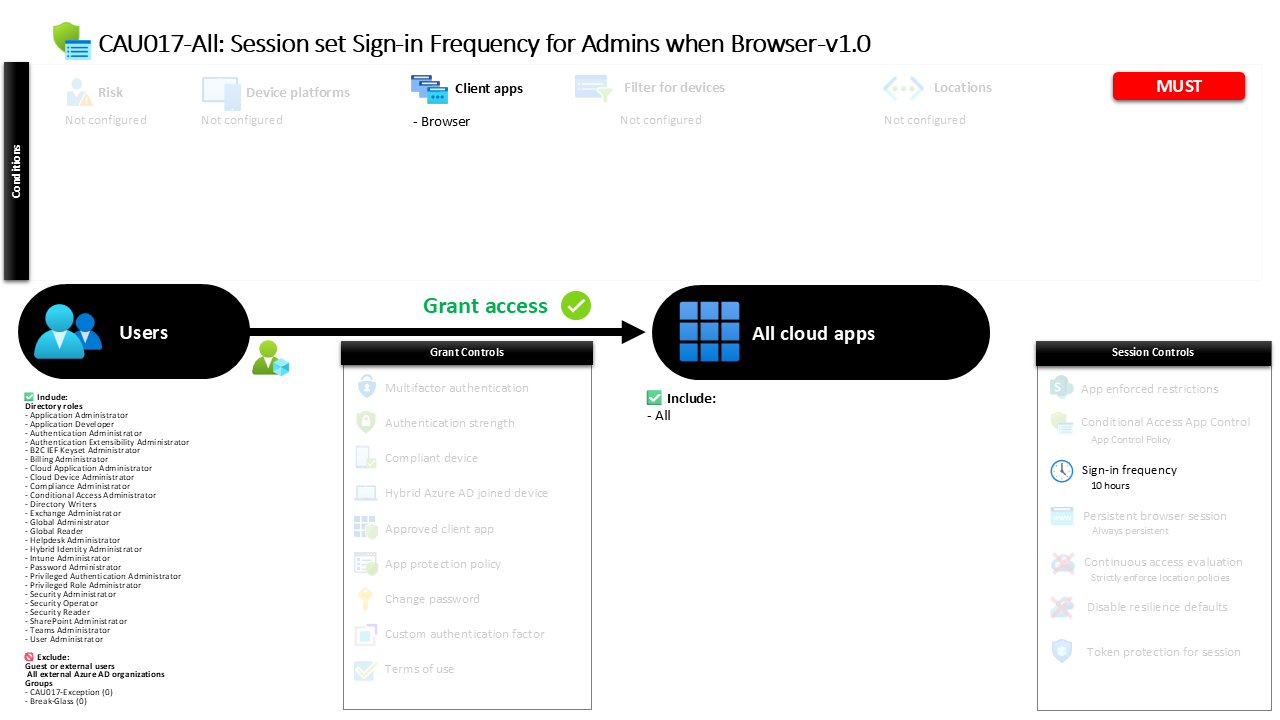
This Conditional Access sign-in frequency policy requires administrators accessing cloud applications through a browser to reauthenticate every 10 hours.
What This Conditional Access Policy Does
The primary goal of this Conditional Access sign-in frequency policy is to limit how long administrative browser sessions remain valid before the identity must be verified again. Rather than relying on long-lived authentication tokens that may remain active throughout an entire workday or longer, the policy defines a clear time boundary for session validity.
In this configuration, administrators who access cloud applications through a web browser must reauthenticate after ten hours. The authentication requirement applies to both the initial identity verification and any secondary authentication methods that may be used during sign-in. When the defined time interval expires, the next interaction with a protected application triggers a fresh authentication request.
This mechanism does not block access or restrict applications. Instead, it introduces a session lifecycle control. Conditional Access continuously evaluates whether the session still falls within the defined authentication window. If the time limit has passed, the user is prompted to sign in again.
From a security architecture perspective, this approach reduces the risk associated with unattended or hijacked sessions. It ensures that administrative access remains tied to recently validated credentials.
Who the Policy Applies To
The policy focuses specifically on privileged identities by targeting administrative roles within the directory. Rather than applying the rule to all users, the design limits the session control to identities that hold administrative permissions.
Administrative roles typically include accounts responsible for tenant configuration, identity management, application administration, and security operations. These roles provide powerful capabilities that can affect the entire environment. Because of this elevated privilege level, administrators represent high-value targets for attackers.
By applying the policy at the role level, the configuration automatically covers any user who is assigned administrative permissions. When someone receives a privileged role assignment, they immediately fall under the same session control requirements without needing additional configuration.
The policy also excludes a small number of defined groups. In many environments, such exclusions are used to support controlled exception management, such as emergency accounts or operational scenarios where temporary policy bypasses may be required under approval workflows.
This role-based targeting reflects a common Conditional Access design pattern: protect privileged identities with stricter session security than standard user accounts.
What Apps and Services the Policy Protects
This Conditional Access policy applies broadly across cloud applications rather than targeting a single service. Whenever an administrator accesses a protected application through a browser, the defined session rule becomes part of the sign-in evaluation.
Applying the control across all cloud applications ensures consistent session behavior. Administrative work frequently spans multiple portals and services during a single session. An administrator might move between identity management, security configuration, or application management tools in quick succession.
If session controls were limited to specific applications, the authentication lifecycle could vary between services. That inconsistency introduces gaps where longer-lived sessions might remain active in certain environments.
By applying the session control globally, the policy ensures that administrative browser sessions follow the same authentication timeline everywhere. Conditional Access evaluates the session age regardless of which application the administrator interacts with.
This design reinforces the concept that privileged access should be protected consistently across the entire identity platform.
Platforms, Devices, and Client Apps in Scope
The scope of this policy is intentionally narrow when it comes to client application types. It applies specifically to browser-based access.
Administrative work is often performed through web portals such as management consoles, configuration interfaces, and administrative dashboards. Browser sessions are convenient, but they also introduce risk because session cookies can persist even after the administrator steps away from the device.
By focusing on browser sessions, the policy targets one of the most common administrative access paths. When an administrator signs in through a browser to access cloud services, Conditional Access evaluates the session control configuration.
Other client application types are outside the scope of this policy. As a result, the session control applies only when administrative activities occur through web-based access.
This design approach reflects a practical balance. It strengthens the security posture of administrative browser sessions without introducing unnecessary friction in other access scenarios.
How Access Is Decided
Conditional Access evaluates several conditions during each sign-in attempt. In this policy, the evaluation begins by determining whether the user holds one of the targeted administrative roles. If the user is not in scope, the policy does not apply.
Next, Conditional Access checks the client application type. The rule activates only when the sign-in originates from a browser. If the access method matches this condition, the session control becomes active.
Once the administrator successfully authenticates, Conditional Access records the authentication timestamp. From that moment forward, the session remains valid until the defined authentication interval expires.
The configured interval is ten hours. When that threshold is reached, Conditional Access considers the existing authentication no longer sufficient. The next interaction with a protected application triggers a fresh sign-in prompt.
Because the session control requires both primary and secondary authentication to be renewed, the entire authentication chain must be completed again. This ensures that both identity verification steps remain recent.
What the User Experience Looks Like During Sign-In
From an administrator’s perspective, the experience is straightforward and predictable. The initial sign-in to a browser-based application proceeds normally. After authentication completes, the session behaves like any other active session.
During the next several hours, the administrator can move between applications and management portals without interruption. Conditional Access continues monitoring the session age in the background.
When the ten-hour authentication window expires, the next attempt to interact with a protected resource triggers a sign-in request. The administrator is redirected to the authentication process and completes both identity verification steps again.
After reauthentication, a new session window begins and the ten-hour interval resets. The administrator can continue working without disruption until the next session boundary occurs.
This predictable cycle ensures that administrative sessions remain tied to recent identity verification while still allowing administrators to perform extended work sessions without constant prompts.
Why This Policy Matters for Security and the Business
Privileged identities represent one of the most critical attack surfaces in any cloud environment. If an attacker gains control of an administrative session, they may be able to modify security policies, create new identities, or access sensitive data.
Session controls address a specific risk within that threat model: stale authentication. Even if the initial authentication was legitimate, a session that remains active for too long becomes vulnerable to misuse.
By enforcing a defined authentication interval, the policy ensures that privileged sessions are periodically revalidated. This significantly reduces the window in which an unattended or compromised browser session can be exploited.
From a business perspective, the policy also introduces predictability. Administrators know that authentication refreshes occur on a defined schedule rather than randomly or unpredictably.
The result is a balanced approach that improves security while maintaining an efficient administrative workflow.
Is This a Foundational or Must-Have Policy?
This type of session control is widely considered a foundational security measure for privileged access management.
Modern identity security frameworks emphasize continuous verification. Instead of trusting that a user who authenticated once remains trustworthy indefinitely, systems periodically reconfirm identity and context.
Administrative accounts are particularly important in this model. Because they control critical services and security settings, their authentication lifecycle must be carefully managed.
A Conditional Access sign-in frequency policy helps enforce this principle without requiring complex infrastructure. It introduces a predictable session boundary that ensures administrative access is always backed by recent authentication.
For organizations adopting a Zero Trust identity architecture, session lifetime controls for administrators are an important component of the overall design.
Important Design Choices and Things to Notice
One notable design decision in this policy is the focus on browser-based administrative access. This reflects the reality that many management activities occur through web portals rather than traditional applications.
Another important detail is the authentication scope. The session control requires both the primary authentication and any secondary authentication to be renewed when the session expires. This ensures that identity verification remains comprehensive rather than partial.
The ten-hour interval is also significant. It allows administrators to complete a full workday session while still enforcing a clear authentication boundary. Shorter intervals might introduce unnecessary interruptions, while longer intervals could extend the risk window for session misuse.
The use of role targeting is another deliberate design choice. By focusing on administrative roles rather than individual accounts, the policy automatically applies to anyone granted privileged permissions.
Together, these design decisions demonstrate a careful balance between operational usability and strong identity protection.
Conditional Access Design Principles Behind This Policy
Several key Conditional Access design principles are visible in this configuration.
First, the policy applies stricter controls to privileged identities. Administrative accounts are treated differently because they represent higher risk and require stronger protections.
Second, the design emphasizes session lifecycle management. Authentication is not treated as a one-time event but as something that must be refreshed periodically to maintain trust.
Third, the policy focuses on realistic administrative workflows. Instead of enforcing extremely short authentication intervals that could disrupt productivity, the session boundary allows extended work sessions while still maintaining security oversight.
Finally, the configuration demonstrates the principle of centralized identity control. By applying the rule across cloud applications, the policy ensures consistent security behavior regardless of where administrative activity occurs.
These principles reflect the broader philosophy behind Conditional Access: identity-driven security decisions that adapt to risk and context.
Final Thoughts
Administrative access is one of the most sensitive areas of any cloud identity platform. While strong authentication is essential, session management is equally important.
A Conditional Access sign-in frequency policy provides a practical way to ensure that privileged browser sessions remain tied to recent authentication. By enforcing a ten-hour session boundary for administrators, this policy reduces the risk associated with unattended or compromised sessions.
The design also illustrates how Conditional Access can introduce meaningful security improvements without creating unnecessary friction for administrators. Authentication refreshes occur at predictable intervals, allowing administrators to maintain productivity while still benefiting from stronger identity protection.
In modern Microsoft Entra environments, session controls like this one form an important layer in a broader identity security strategy. They ensure that privileged access remains continuously verified, which is a cornerstone of Zero Trust security architecture.
