
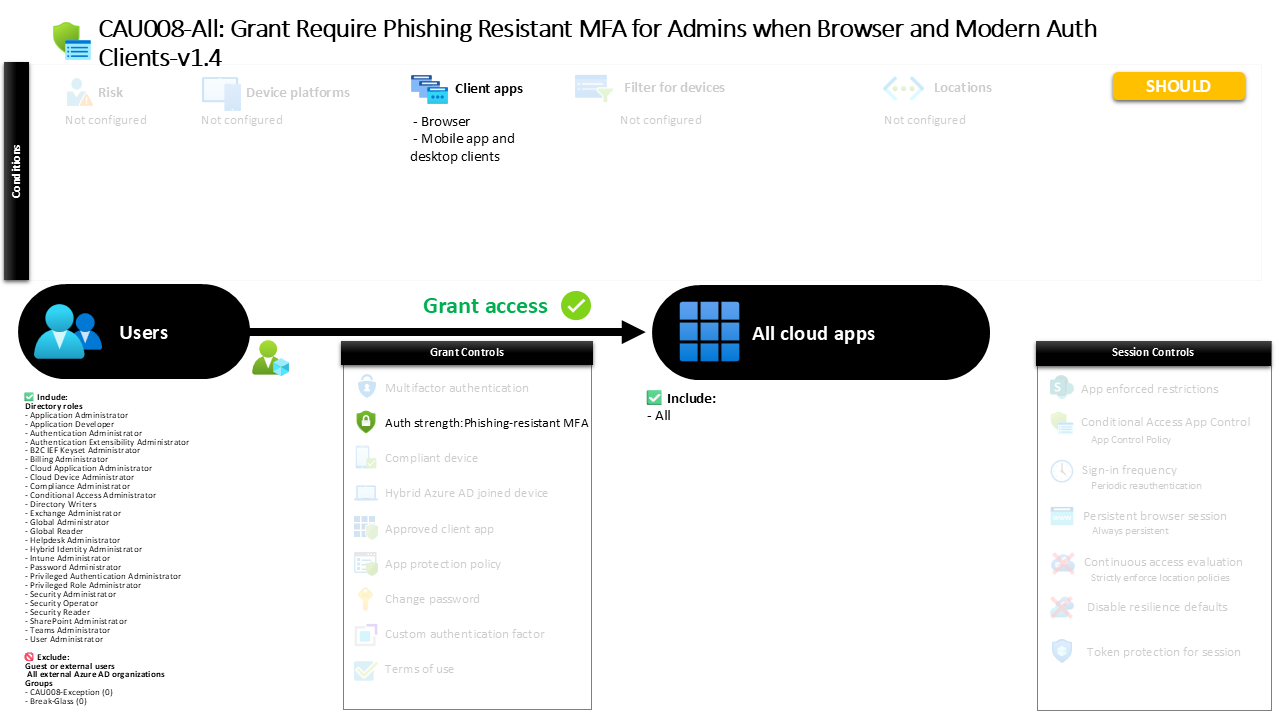
Conditional Access Phishing Resistant MFA AU008-All Grant Require Phishing Resistant MFA for Admins when Browser and Modern Auth Clients
Introduction
Conditional Access phishing resistant MFA has become one of the most important defenses against modern identity attacks. Password theft, phishing kits, and session hijacking tools increasingly target administrative accounts because they provide broad access to critical systems. Once a privileged identity is compromised, attackers can move laterally through the environment and escalate their control rapidly.
To counter this risk, organizations often introduce policies that require authentication methods resistant to phishing techniques. These methods ensure that even if an attacker tricks a user into revealing credentials, the attacker cannot successfully authenticate.
This Conditional Access policy is designed around that principle. It focuses on privileged identities and enforces stronger authentication requirements whenever those accounts sign in through common access methods such as browsers or modern client applications. By introducing phishing resistant authentication for administrative roles, the policy strengthens the identity layer of the security architecture and significantly reduces the attack surface associated with credential-based compromise.

This Policy in One Line
This Conditional Access policy requires privileged administrative identities to authenticate using phishing resistant multi-factor authentication when accessing cloud applications through browsers or modern authentication clients.
What This Conditional Access Policy Does
At its core, this policy introduces a stronger authentication requirement for administrative identities. Instead of allowing any standard multi-factor authentication method, the policy enforces a specific authentication strength designed to resist phishing attacks.
Conditional Access evaluates sign-in events and determines whether the user holds a privileged administrative role. When such a role is detected, the system evaluates how the user is attempting to access cloud services. If the sign-in occurs through a browser or through modern client applications such as mobile or desktop apps that support modern authentication, the policy introduces an additional requirement.
Rather than allowing weaker second factors such as SMS or basic authenticator prompts, the policy requires authentication methods that are inherently resistant to phishing. Examples include hardware-backed security keys, platform-based authentication such as Windows Hello for Business, or certificate-based authentication methods.
From a security architecture perspective, this design ensures that administrative access always relies on authentication methods that cannot easily be intercepted, replayed, or proxied by phishing infrastructure.
Who the Policy Applies To
The policy targets privileged administrative identities within the Microsoft Entra environment. These identities are associated with built-in administrative roles that grant elevated capabilities across identity management, security configuration, application administration, and tenant-level operations.
By targeting administrative roles rather than individual user accounts, the policy aligns with a role-based security model. This ensures that whenever a user is granted administrative privileges, the stronger authentication requirements automatically apply.
This approach simplifies long-term governance. Instead of maintaining static user lists, the policy dynamically protects any account that receives administrative permissions. The moment a user becomes an administrator, the stronger authentication controls apply.
The configuration also includes specific exclusion groups. Organizations often use these groups to support controlled exceptions through internal approval processes. Temporary exemptions may be required during emergency troubleshooting, service recovery scenarios, or when onboarding hardware authentication methods. Using groups for this purpose allows organizations to manage exceptions centrally while maintaining a clear audit trail.
Additionally, external service provider identities are excluded from this policy scope.
What Apps and Services the Policy Protects
This policy protects access to all cloud applications within the Microsoft Entra environment. Rather than focusing on a single workload such as Exchange, SharePoint, or Teams, the design applies the authentication requirement broadly across the entire application ecosystem.
This design decision is intentional. Administrative roles rarely operate within a single application. A tenant administrator, for example, may need to access identity configuration portals, security dashboards, application registrations, or automation services during a single administrative session.
By protecting all cloud applications, the policy ensures that phishing resistant authentication is enforced consistently across the entire administrative surface area. This prevents attackers from bypassing strong authentication by targeting a less protected application entry point.
From a security design perspective, this creates a uniform protection boundary around privileged access.
Platforms, Devices, and Client Apps in Scope
Conditional Access policies often evaluate the type of client used during authentication. In this configuration, the policy applies when administrators sign in through browsers or through modern authentication clients used by desktop or mobile applications.
Browsers remain one of the most common entry points for administrative activity because many administrative portals and management consoles are web-based. Similarly, modern authentication clients are widely used by applications that integrate directly with Microsoft Entra identity services.
By focusing on these client types, the policy captures the majority of administrative sign-in activity while ensuring that strong authentication requirements are enforced where privileged operations are most likely to occur.
No additional platform, device, or location conditions are defined. As a result, the policy evaluates these authentication requirements consistently regardless of the operating system or device used during the sign-in process.
How Access Is Decided
When a sign-in attempt occurs, Conditional Access evaluates several attributes of the authentication request. The system first determines whether the user holds a privileged administrative role targeted by the policy.
If the user meets that condition, Conditional Access evaluates the application being accessed and the type of client initiating the sign-in. When the request involves a cloud application and originates from a browser or a modern authentication client, the policy applies its authentication requirement.
At that point, the sign-in process must satisfy a phishing resistant authentication strength. This requirement restricts authentication to methods designed to resist credential phishing and replay attacks.
Supported methods include hardware-backed security keys based on FIDO2 standards, device-bound authentication mechanisms such as Windows Hello for Business, and certificate-based authentication approaches that rely on cryptographic identity validation.
Only when one of these authentication methods successfully completes can the sign-in proceed.
What the User Experience Looks Like During Sign-In
From the administrator’s perspective, the sign-in process appears similar to a normal authentication flow but with stricter method requirements.
Imagine an administrator opening a browser and navigating to a cloud administration portal. After entering their username, the authentication system determines that the account holds administrative privileges and that the policy applies.
Instead of presenting multiple authentication options, the sign-in experience requires one of the allowed phishing resistant methods. The administrator may insert a FIDO2 security key, authenticate with Windows Hello for Business using biometric verification, or complete a certificate-based authentication process.
Because these methods rely on hardware-backed cryptographic validation rather than shared secrets, they cannot be easily intercepted or replayed by attackers. The authentication process therefore ensures that the individual completing the sign-in truly possesses the required authentication device or credential.
Why This Policy Matters for Security and the Business
Privileged accounts represent the most valuable targets within identity systems. Attackers understand that compromising a single administrator account can provide broad access to cloud infrastructure, identity configuration, and security controls.
Traditional multi-factor authentication improves security, but many common methods remain vulnerable to phishing attacks. Attackers increasingly use adversary-in-the-middle techniques to capture authentication prompts and replay them in real time.
Phishing resistant authentication removes this attack path. Hardware security keys, device-bound credentials, and certificate-based authentication rely on cryptographic mechanisms that bind authentication to specific devices or keys.
For the business, this dramatically reduces the likelihood of administrative compromise. The policy therefore strengthens the security posture of the organization while ensuring that privileged access aligns with modern identity protection practices.
Is This a Foundational or Must-Have Policy?
This policy should be considered a must-have control for organizations that rely on Microsoft Entra identity services. Protecting administrative accounts with phishing resistant authentication is widely recognized as a critical security measure.
Many security frameworks and industry best practices emphasize the importance of hardware-backed authentication for privileged identities. By implementing this requirement within Conditional Access, organizations embed this control directly into the identity platform.
As organizations move toward passwordless authentication models, policies like this form the backbone of secure administrative access.
Important Design Choices and Things to Notice
Several design decisions within this policy reveal a deliberate security strategy.
First, the use of an authentication strength requirement ensures that only phishing resistant authentication methods are accepted. This prevents fallback to weaker authentication mechanisms that attackers might exploit.
Second, the policy targets administrative roles rather than static user lists. This role-based approach ensures that protection automatically extends to new administrators without requiring manual updates.
Third, the policy focuses on browser and modern authentication clients. These represent the most common entry points for administrative activity, ensuring that the strongest authentication methods protect the majority of privileged sign-in scenarios.
Finally, the use of exclusion groups allows organizations to manage exceptional situations through controlled processes rather than permanently weakening the policy.
Conditional Access Design Principles Behind This Policy
This policy reflects several core Conditional Access design principles.
The first principle is protecting privileged identities above all others. Administrative accounts carry the highest impact risk and therefore require the strongest authentication mechanisms.
The second principle is enforcing authentication strength rather than relying solely on basic MFA. Authentication strength policies allow organizations to define exactly which authentication methods are considered secure enough for specific scenarios.
The third principle is broad protection across applications. By applying the policy to all cloud applications, the design avoids gaps that attackers could exploit through alternative entry points.
Together, these principles create a layered identity protection strategy centered on strong authentication for high-impact identities.
Final Thoughts
Modern identity attacks continue to evolve, but the most effective defenses remain rooted in strong authentication design. By requiring phishing resistant authentication methods for administrative accounts, this Conditional Access policy introduces a powerful barrier against credential-based compromise.
Hardware-backed authentication methods such as FIDO2 keys, Windows Hello for Business, and certificate-based authentication shift security away from passwords and toward cryptographic identity verification.
For organizations looking to strengthen their Microsoft Entra security posture, implementing Conditional Access phishing resistant MFA for privileged roles represents a practical and highly effective step toward resilient identity protection.