
Conditional Access Sign-In Frequency Policy CAD008 Session Set Sign-In Frequency for All Users When Browser and Non-Compliant
Introduction
Conditional Access sign-in frequency is designed to solve a subtle but common security challenge. Users often access cloud applications from browsers on devices that are not fully trusted by the organization. These sessions can remain active for long periods, which increases the risk of unauthorized access if a device is shared, stolen, or compromised. A carefully designed Conditional Access sign-in frequency policy limits how long a browser session can remain authenticated before the user must verify their identity again.
This policy introduces a controlled session lifetime for browser access when the device itself cannot be considered trusted. Instead of relying solely on the initial authentication event, the policy ensures that users periodically confirm their identity during continued access to cloud services. The design focuses on maintaining usability while reducing the security exposure created by persistent browser sessions.
By introducing predictable reauthentication intervals for browser-based access from unmanaged or non-compliant devices, this Conditional Access design adds an important layer of identity verification that supports modern zero trust access strategies.

This Policy in One Line
This Conditional Access sign-in frequency policy requires users to reauthenticate every day when accessing cloud applications through a browser from devices that are not trusted or compliant.
What This Conditional Access Policy Does
The core objective of this Conditional Access sign-in frequency policy is to control how long a browser session remains authenticated when the device does not meet trusted device conditions. Instead of allowing a browser session to persist indefinitely, the policy introduces a time-based authentication requirement that periodically asks the user to confirm their identity again.
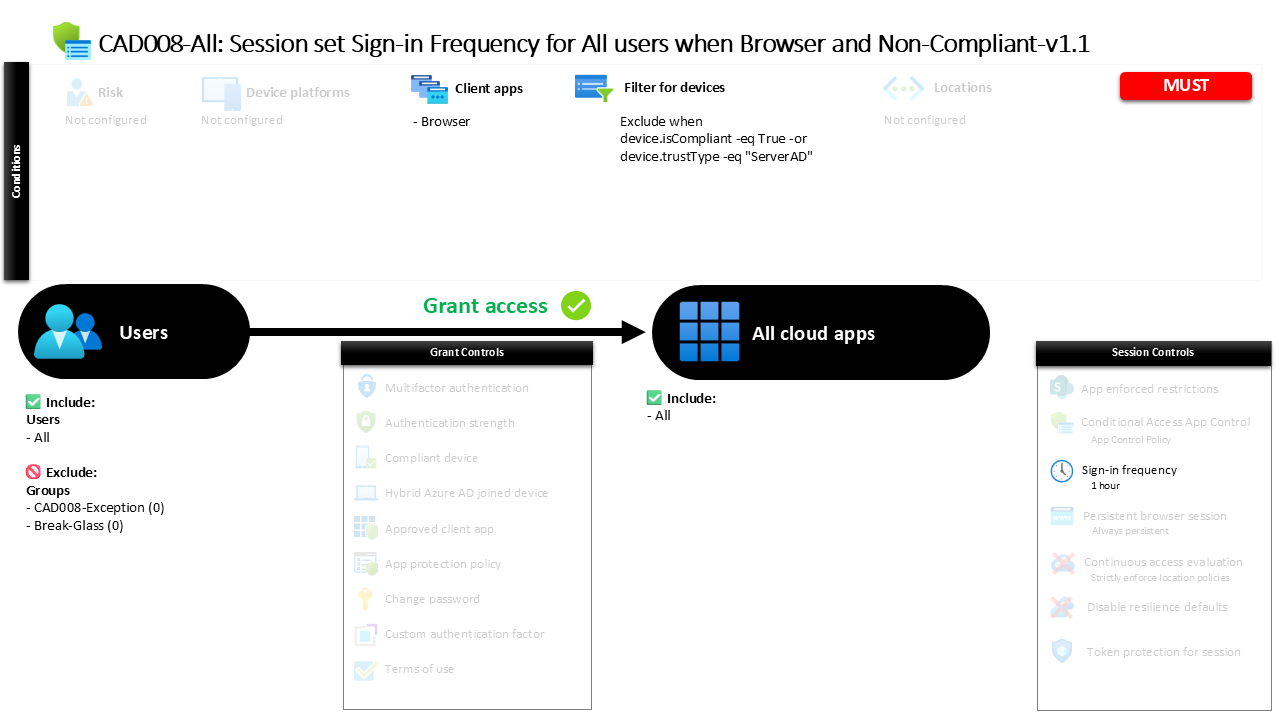
The policy applies a session control that defines a one-day authentication interval. After the user signs in and completes the required authentication steps, the session remains valid for up to one day. Once that period expires, the next interaction with the protected application triggers a new authentication request.
Importantly, the session control applies to both primary and secondary authentication events. This means that the reauthentication cycle requires the user to complete the full authentication process again rather than silently refreshing the session.
From a security design perspective, this configuration addresses the risk of long-lived browser sessions on devices that cannot be considered secure endpoints. By enforcing periodic identity verification, the organization ensures that continued access to cloud resources always remains tied to a recently verified user identity.
Who the Policy Applies To
The policy targets all users within the directory. This broad scope reflects a design decision that browser access from unmanaged devices represents a general security concern rather than a scenario limited to specific user groups.
However, certain groups are excluded from the policy scope. Organizations commonly maintain exclusion groups for Conditional Access policies to support controlled exception management. These groups often include accounts that require alternative access handling, specialized operational scenarios, or temporary policy bypass through an approved workflow.
This approach allows security teams to enforce strong baseline protections for the majority of users while maintaining operational flexibility when exceptions are necessary. Rather than weakening the entire policy, exclusions allow administrators to handle edge cases in a structured and auditable way.
By applying the policy broadly and controlling exceptions through dedicated groups, the design aligns with common Conditional Access governance practices that balance security enforcement with operational practicality.
What Apps and Services the Policy Protects
The scope of this policy includes all cloud applications available through the identity platform. Instead of targeting a limited set of services, the policy is designed to influence the browser session behavior for any application accessed through the identity system.
This design choice simplifies policy management while ensuring consistent protection across the cloud environment. Whenever a user accesses a supported application through a browser session, the same sign-in frequency rule applies if the device falls within the policy conditions.
In practice, this means that the session lifetime behavior becomes predictable across the organization. Users accessing productivity tools, collaboration services, or line-of-business applications through a browser will encounter the same authentication refresh pattern when the device is not trusted.
From a Conditional Access architecture perspective, protecting all cloud applications ensures that session-based risks are addressed consistently across the environment rather than creating gaps between individual services.
Platforms, Devices, and Client Apps in Scope
The policy specifically evaluates browser-based access. Only sign-in attempts initiated through a browser client are considered when the policy conditions are evaluated.
Device state also plays a central role in determining whether the policy applies. Devices that meet trusted device conditions are intentionally excluded from the policy scope. Trusted devices include those recognized as compliant devices as well as devices identified as domain-joined within the organization’s identity environment.
As a result, the policy focuses exclusively on browser access from devices that do not meet those trust indicators. These devices may include unmanaged personal devices, unknown endpoints, or systems that have not been enrolled into device management.
This filtering approach demonstrates a common Conditional Access design pattern. Instead of applying stricter session controls to every device, the organization differentiates between trusted and untrusted endpoints and adjusts authentication requirements accordingly.
How Access Is Decided
When a user signs in through a browser, Conditional Access evaluates several factors before determining how the session should behave. First, the system confirms that the access attempt originates from a browser client application. Only browser sessions fall within the policy scope.
Next, the device characteristics are evaluated. If the device is identified as compliant or recognized as a trusted domain-joined system, the policy does not apply. In those cases, the user experiences the normal session behavior defined elsewhere in the environment.
If the device does not meet those trust indicators, the policy becomes active. Conditional Access then applies the configured session control that defines the maximum allowed authentication lifetime.
This evaluation process happens automatically during the sign-in flow. The user may not notice the policy during the initial login, but the session behavior changes once the authentication interval expires. At that point, Conditional Access requires the user to authenticate again before continuing to access cloud resources.
What the User Experience Looks Like During Sign-In
From the user’s perspective, the experience initially appears normal. They sign in through the browser, complete the authentication process, and begin working with the application.
The difference becomes visible later, when the authentication interval reaches its configured limit. After approximately one day, the next interaction with the service prompts the user to sign in again. This authentication event confirms both the user’s primary credentials and the secondary authentication method.
For users accessing services from personal devices or unmanaged systems, this behavior becomes part of the normal rhythm of browser-based access. The system periodically verifies the identity behind the session without significantly disrupting productivity.
Users working from trusted managed devices typically experience fewer authentication prompts because those devices fall outside the policy conditions. This distinction reinforces the organization’s device trust model while maintaining a smooth user experience for managed endpoints.
Why This Policy Matters for Security and the Business
Persistent browser sessions can quietly introduce risk into a cloud environment. When authentication remains valid for extended periods, access to sensitive data may continue even if the original user is no longer present at the device.
This Conditional Access sign-in frequency policy reduces that exposure window by enforcing regular identity verification. By requiring reauthentication every day for browser sessions on unmanaged devices, the organization ensures that access remains tied to an actively verified user.
The policy also supports broader zero trust principles. Instead of assuming that an authenticated session should remain valid indefinitely, the environment continuously reevaluates whether access should continue.
For the business, this approach improves security without blocking productivity. Users retain the ability to work from various devices, but the environment ensures that identity verification remains frequent enough to limit the risk of unauthorized session reuse.
Is This a Foundational or Must-Have Policy?
A Conditional Access sign-in frequency policy for unmanaged browser access is widely considered a foundational control in modern cloud identity security.
Many organizations allow employees, contractors, or partners to access applications through personal devices or systems that are not fully managed by the organization. While this flexibility supports productivity, it also introduces uncertainty about device security.
Session controls provide a practical way to address that challenge. Instead of blocking access entirely, organizations allow the connection but introduce stronger identity verification requirements over time.
This approach aligns with common Conditional Access design frameworks where trusted devices receive the smoothest user experience while unmanaged devices operate under stricter session controls. In practice, this policy acts as a safeguard that keeps browser sessions from becoming long-lived access points to sensitive resources.
Important Design Choices and Things to Notice
Several design decisions stand out in this Conditional Access configuration. One notable choice is the focus on browser access specifically. Browser sessions tend to persist longer and may occur on devices outside the organization’s management boundaries, making them an important target for session control policies.
Another important design element is the device trust filter. By excluding devices that are compliant or recognized as domain-joined, the policy avoids unnecessary authentication prompts for users working from managed systems. This preserves productivity while still protecting access from less trusted endpoints.
The authentication interval itself is also significant. A one-day interval strikes a balance between strong security and acceptable usability. Users are not asked to authenticate constantly, but sessions cannot remain active for extended periods without identity verification.
Together, these choices demonstrate a layered Conditional Access strategy that differentiates between trusted and untrusted environments.
Conditional Access Design Principles Behind This Policy
This policy reflects several well-established Conditional Access design principles. The first principle is device trust awareness. Access decisions are influenced by whether the device meets established trust indicators such as compliance or domain trust.
The second principle is session risk management. Instead of treating authentication as a one-time event, the environment periodically reevaluates whether the session should remain active.
Another key principle is consistency across applications. Because the policy applies to all cloud applications, the organization avoids fragmented security controls that vary between services.
Finally, the policy demonstrates the concept of adaptive authentication. Managed devices receive a more seamless experience, while unmanaged devices require stronger ongoing identity verification.
These principles together form the foundation of a mature Conditional Access architecture.
Final Thoughts
Browser-based access from unmanaged devices is one of the most common entry points into modern cloud environments. While it enables flexibility and productivity, it also creates opportunities for long-lived sessions that may outlast the user’s presence at the device.
This Conditional Access sign-in frequency policy addresses that challenge with a simple but effective control. By requiring users to reauthenticate every day when accessing cloud applications from untrusted browser environments, the organization keeps identity verification fresh and reduces the risk associated with persistent sessions.
The policy demonstrates how Conditional Access can intelligently balance usability and security. Instead of blocking access outright, it introduces predictable session controls that ensure ongoing identity validation.
When implemented as part of a broader Conditional Access strategy, session controls like this help maintain strong security while still supporting the diverse ways people access modern cloud services.