

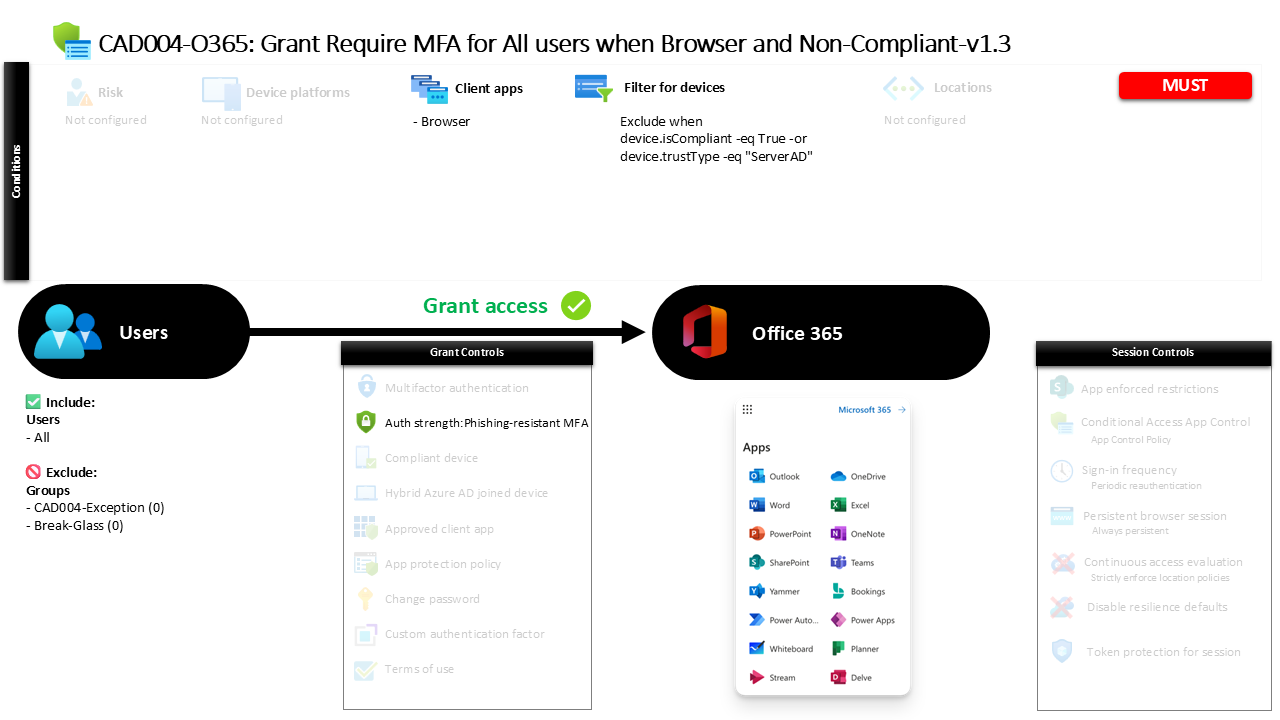
Conditional Access Browser MFA Policy CAD004-O365 Require MFA for All Users When Browser and Non-Compliant
Introduction
Conditional Access browser MFA is often deployed to solve a very common security challenge: users signing in to cloud services through web browsers on devices that the organization does not fully trust. A user might open a personal laptop, connect from a borrowed workstation, or access Microsoft 365 through a browser outside the managed device ecosystem. In those situations, identity becomes the most reliable security boundary.
This policy addresses that exact scenario. When a browser session originates from a device that does not meet compliance requirements or does not present a trusted device relationship, the policy introduces stronger authentication requirements before access is granted. Instead of blocking access outright, the design raises the security bar by requiring multi-factor authentication using specific modern authentication methods.
This approach reflects a common Conditional Access architecture pattern. Device trust reduces friction for managed endpoints, while identity verification strengthens protection when the device itself cannot be relied upon.

This Policy in One Line
Require strong multi-factor authentication when users access Microsoft 365 services through a browser from devices that are not compliant or not trusted.
What This Conditional Access Policy Does
The design intention of this policy is to introduce stronger identity verification when users access Microsoft 365 services through a web browser from devices that fall outside the organization’s trusted device posture.
Conditional Access evaluates multiple attributes during sign-in. In this case, the evaluation focuses on three elements working together: the application being accessed, the client application type, and the device state. The policy specifically evaluates browser-based sessions and determines whether the device presenting the request satisfies device trust conditions.
If the device does not meet those trust conditions, the policy requires the user to complete multi-factor authentication using a defined authentication strength. Instead of relying on basic MFA prompts alone, the authentication strength defines which authentication method combinations are acceptable.
From a security design perspective, this configuration reflects a layered access model. Trusted devices allow seamless productivity, while browser sessions originating from less trusted devices trigger stronger identity validation before cloud resources are made available.
Who the Policy Applies To
The design of this policy intentionally covers the entire user population. When a Conditional Access policy targets all users, it ensures that the browser security posture is applied consistently across identities interacting with Microsoft 365 services.
In practice, organizations rarely deploy broad policies without controlled exceptions. This configuration includes exclusion groups that are not publicly named. These groups typically support operational flexibility such as break-glass accounts, service accounts, or temporary troubleshooting access.
Organizations often maintain these exclusion groups as part of a formal access governance process. Membership may be approved through change control workflows or limited to emergency access procedures. This approach ensures that security policies remain strong while administrators still retain the ability to safely recover from authentication issues.
By applying the policy broadly while maintaining controlled exceptions, the design aligns with common Conditional Access governance models used in mature identity security environments.
What Apps and Services the Policy Protects
This policy focuses on protecting the core Microsoft 365 service ecosystem. When users sign in through a browser, Conditional Access evaluates access to the collection of productivity services delivered through Microsoft 365.
In practice, this includes services such as email access, collaboration platforms, document storage, and other web-based productivity experiences that form the backbone of modern workplace environments.
Browser sessions represent a particularly important access path because they often bypass the device management controls present in fully managed endpoints. A user can access cloud resources through a web browser from almost any device, which means the identity layer becomes the critical point of security enforcement.
By applying this policy to the Microsoft 365 service suite, the organization ensures that browser-based access to sensitive collaboration and communication data always requires a strong identity verification process when device trust cannot be established.
Platforms, Devices, and Client Apps in Scope
The policy specifically evaluates browser-based client applications. When a user accesses Microsoft 365 services through a web browser, Conditional Access evaluates whether the device meets the organization’s trust criteria.
The device evaluation relies on a filtering mechanism. Devices that meet compliance requirements or present a trusted directory relationship are excluded from the policy’s enforcement logic. This means compliant devices and trusted domain-joined devices are treated as part of the organization’s trusted endpoint environment.
Devices that do not meet those criteria remain within scope. These may include personal devices, unmanaged systems, or endpoints that have not been enrolled into device management.
This filtering approach allows Conditional Access to differentiate between trusted corporate endpoints and potentially untrusted devices. Instead of applying identical authentication requirements everywhere, the policy adapts its behavior depending on the device context detected during sign-in.
How Access Is Decided
When a sign-in attempt occurs, Conditional Access evaluates the request through a sequence of logical checks. First, the system confirms that the user is within scope of the policy and that the request targets Microsoft 365 services through a browser.
Next, the device characteristics are evaluated using the configured device filter. If the device is compliant or recognized as a trusted directory-joined device, the policy does not apply additional authentication requirements.
If the device does not meet those criteria, the policy requires authentication using a defined authentication strength that satisfies multi-factor authentication requirements.
The configured authentication strength allows several modern authentication combinations. These include hardware-backed credentials such as Windows Hello for Business and FIDO2 security keys, certificate-based authentication methods, push-based verification using an authenticator application, and temporary access pass mechanisms used during identity lifecycle events.
By defining the acceptable authentication combinations explicitly, the policy ensures that identity verification meets modern authentication security standards.
What the User Experience Looks Like During Sign-In
From the user’s perspective, the experience changes depending on the device they are using.
If a user signs in from a compliant or trusted device, the sign-in process proceeds normally without additional prompts from this policy. The trusted device relationship satisfies the security conditions, allowing the user to continue with minimal interruption.
However, if the user opens a browser session from a device that does not meet those trust requirements, Conditional Access introduces an additional identity verification step. After entering their credentials, the user must complete multi-factor authentication using one of the allowed authentication method combinations.
For example, the user may confirm the sign-in through a secure push notification in an authenticator application or authenticate using a hardware-based credential such as a FIDO2 key.
This dynamic experience balances security and usability by applying stronger verification only when the device environment introduces additional risk.
Why This Policy Matters for Security and the Business
Browser access represents one of the most flexible and widely used access paths to cloud productivity services. That flexibility also introduces risk because users can authenticate from devices that fall completely outside the organization’s control.
This policy strengthens security at exactly that point of exposure. When device trust cannot be verified, the policy shifts security responsibility toward identity verification through multi-factor authentication.
For the business, this means employees can still access services when needed, even from personal or unmanaged devices, but only after completing strong authentication.
The result is a security model that protects sensitive collaboration platforms while preserving workforce productivity. Instead of blocking access entirely, the organization introduces intelligent verification that adapts to the risk level of the device being used.
Is This a Foundational or Must-Have Policy?
Policies that require stronger authentication for browser access from non-trusted devices are widely considered foundational elements of a modern Conditional Access architecture.
Organizations frequently adopt this pattern early in their identity security journey because browser access is both common and difficult to control through device management alone.
By enforcing strong authentication in this scenario, the organization protects a major access pathway to corporate data without disrupting trusted device workflows.
For many Microsoft 365 environments, this type of policy forms part of the baseline Conditional Access framework that establishes identity protection across all users.
Important Design Choices and Things to Notice
Several design choices stand out in this policy configuration.
First, the policy focuses specifically on browser access rather than applying identical controls across all client types. This indicates a targeted security approach that addresses one of the most common unmanaged access paths.
Second, device filtering is used to separate trusted devices from untrusted ones. Compliant devices and trusted directory-joined endpoints are excluded from the enforcement scope, allowing the policy to focus only on higher-risk device scenarios.
Third, the authentication requirement uses an authentication strength rather than a generic MFA control. Authentication strength policies allow organizations to define exactly which authentication method combinations are acceptable.
Together, these choices demonstrate a design that prioritizes both security precision and user experience.
Conditional Access Design Principles Behind This Policy
Several core Conditional Access principles are visible in this policy design.
The first principle is context-based access evaluation. Instead of applying the same requirements everywhere, the policy considers how the user connects to the service and what type of device is involved.
The second principle is adaptive authentication. Authentication strength requirements increase identity assurance when device trust cannot be confirmed.
The third principle is layered identity protection. Rather than relying on a single security control, the policy combines device context with strong authentication methods to create a more resilient access model.
These principles reflect the broader Zero Trust philosophy used in modern Microsoft Entra ID environments, where access decisions continuously evaluate identity, device posture, and application context.
Final Thoughts
Conditional Access browser MFA policies play a critical role in protecting cloud services from unmanaged access scenarios. Web browsers offer unmatched flexibility for accessing productivity platforms, but that flexibility must be balanced with strong identity security.
By requiring modern multi-factor authentication when browser sessions originate from non-compliant devices, this policy introduces a practical safeguard against credential misuse and unauthorized access.
The design shows how Conditional Access can adapt its behavior based on device trust while maintaining a seamless experience for users on trusted endpoints.
In mature identity security architectures, policies like this help ensure that cloud collaboration platforms remain both accessible and secure, regardless of where or how users connect.
