

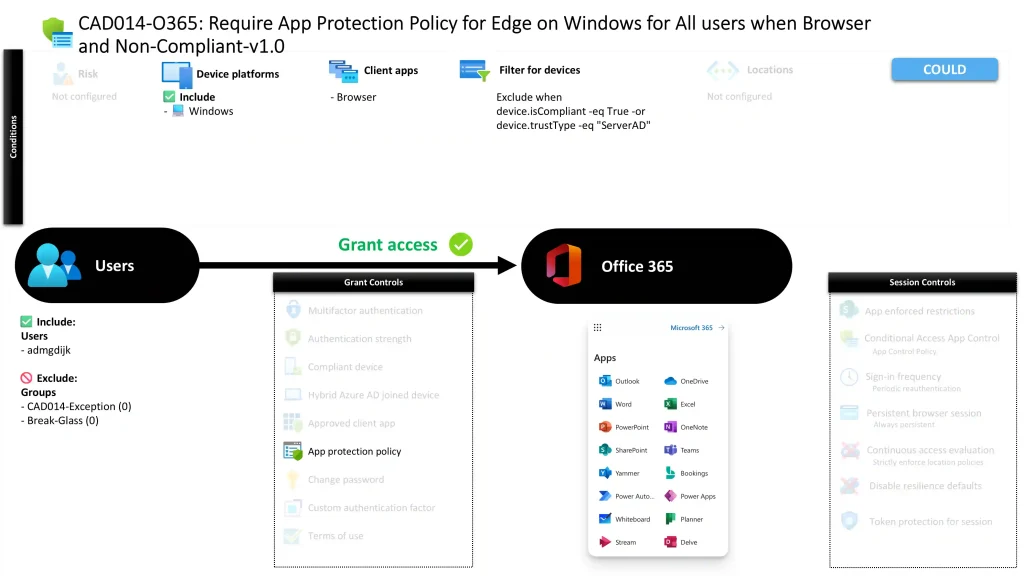
Conditional Access App Protection for Edge on Windows CAD014-O365 Require App Protection Policy for Edge on Windows for All users when Browser and Non-Compliant
Introduction
Conditional Access app protection policy controls are designed to solve a common security challenge: how to allow browser access to business services while still protecting corporate data when the device itself cannot be trusted. In many organizations, users open Microsoft 365 services from unmanaged or partially managed machines. These situations create risk because the identity may be legitimate, yet the device environment may not meet the organization’s security standards.
This Conditional Access app protection policy addresses that challenge by allowing browser access from Windows devices while ensuring that the application session itself enforces protection requirements. Rather than fully blocking access, the design focuses on enforcing protected application behavior when the device does not meet compliance expectations.
The result is a balanced approach. Users can continue accessing essential services through a browser, but the session must operate within a controlled environment that protects organizational data. This reflects a common Conditional Access strategy where identity, device posture, and application protection work together to secure cloud access.

This Policy in One Line
This Conditional Access app protection policy requires protected browser access to Microsoft 365 services when Windows devices are not compliant or trusted.
What This Conditional Access Policy Does
The purpose of this Conditional Access app protection policy is to enforce application-level protection when a user attempts to access Microsoft 365 services through a browser on a Windows device that does not meet the organization’s trust requirements. Instead of evaluating only the user identity, Conditional Access also evaluates device state before granting access to cloud resources.
When the policy conditions are met, access is permitted only if the application session satisfies the requirement for a protected application environment. This means the browser session must operate in a way that supports application protection capabilities designed to safeguard corporate data.
From a security architecture perspective, this design prevents unrestricted browser access from devices that fall outside the organization’s managed device posture. Instead of blocking productivity, the policy ensures that the application layer becomes the enforcement point. This approach aligns with modern Conditional Access strategies where access decisions combine identity verification, device trust evaluation, and application protection controls.
Who the Policy Applies To
This Conditional Access app protection policy targets users who are members of a specific security group defined within the identity platform. Group-based targeting is a standard Conditional Access design pattern because it allows administrators to apply policies to defined populations while maintaining flexibility for phased rollouts or operational segmentation.
The configuration also contains exclusion groups. Organizations commonly implement such exclusions to support controlled exception management. These exclusions may represent administrative accounts, break-glass identities, or temporary access groups used for operational continuity.
By structuring the policy around group membership rather than individual accounts, the design ensures that the policy remains manageable as the organization grows. Access control becomes part of identity governance rather than a static configuration.
This approach also supports Conditional Access maturity models where policies are progressively expanded across groups as organizations strengthen their identity and device security posture.
What Apps and Services the Policy Protects
This Conditional Access app protection policy protects Microsoft 365 cloud services accessed through the browser. These services typically represent the organization’s core collaboration and productivity workloads delivered through the Microsoft cloud platform.
Conditional Access evaluates the request when a user attempts to access these services through a supported browser session. The evaluation happens before the application grants access to the user’s content or data.
Because the policy is tied to cloud services rather than individual endpoints, the protection travels with the identity rather than the device. This ensures that security controls apply consistently regardless of where the user signs in.
From a design perspective, targeting cloud service access is a common Conditional Access strategy. It ensures that sensitive workloads remain protected even when access originates from devices that fall outside the organization’s managed endpoint environment.
Platforms, Devices, and Client Apps in Scope
This Conditional Access app protection policy evaluates browser-based access from Windows devices. The policy therefore activates only when a user signs in using a browser client on a Windows platform.
Device evaluation plays a central role in the policy logic. Conditional Access checks the device posture during sign-in and determines whether the device satisfies defined trust conditions. Devices that meet compliance requirements or are recognized as trusted directory-based machines are excluded from the policy evaluation.
When the device does not meet these trust indicators, the policy becomes active. In this scenario, the system treats the device as untrusted or non-compliant and enforces additional security controls at the application level.
This filtering mechanism allows Conditional Access to differentiate between trusted managed devices and unmanaged endpoints. By focusing enforcement only on devices that fall outside the trusted device posture, the policy maintains both security and usability.
How Access Is Decided
During sign-in, Conditional Access evaluates several factors before granting access to Microsoft 365 services. The system first verifies the user identity and confirms whether the user belongs to the group targeted by the policy.
Next, the platform and client application are evaluated. The policy activates only when the sign-in occurs from a browser running on a Windows device. If these conditions are met, Conditional Access then evaluates the device posture.
The device filter determines whether the device qualifies as compliant or trusted. Devices that satisfy those trust conditions bypass the policy. Devices that do not satisfy those conditions are considered non-compliant within the context of this policy.
When a device falls into that category, access is granted only if the application session supports the protected application requirement. This requirement ensures that the browser session enforces application-level protections designed to safeguard corporate data during the session.
This layered evaluation reflects the Conditional Access design principle of combining identity signals, device posture, and application enforcement.
What the User Experience Looks Like During Sign-In
From the user perspective, the Conditional Access app protection policy operates mostly in the background during sign-in. A user signs in to Microsoft 365 services through a browser on a Windows device as they normally would.
If the device meets the organization’s compliance or trust criteria, the sign-in proceeds normally without additional enforcement from this policy. The user experiences standard access to the service.
If the device does not meet those criteria, Conditional Access requires that the application session operate within a protected application environment. This ensures that the browser session adheres to application protection rules that safeguard corporate data during the session.
The goal is not to interrupt productivity but to ensure that data protection mechanisms remain active even when the device itself cannot be fully trusted.
Why This Policy Matters for Security and the Business
This Conditional Access app protection policy addresses a critical reality of modern workplaces: not every device used for business access is fully managed or compliant. Users may work from personal machines, shared devices, or temporary environments where traditional endpoint management cannot enforce controls.
Without Conditional Access enforcement, these scenarios could expose corporate data to unnecessary risk. Sensitive information might be accessed through unmanaged browsers without protection.
By enforcing application protection in these situations, the organization ensures that access remains possible while still protecting business data. The application session becomes the enforcement point for security controls.
This balance between productivity and protection is one of the core design principles of Microsoft Conditional Access and modern Zero Trust architecture.
Is This a Foundational or Must-Have Policy?
This Conditional Access app protection policy is typically considered a foundational security control for organizations that allow browser-based access from unmanaged or partially managed devices.
Many organizations adopt similar policies as part of a broader Conditional Access baseline. The policy complements device compliance requirements by introducing an additional layer of protection for situations where device compliance cannot be guaranteed.
Rather than relying solely on device management, the organization ensures that the application itself enforces data protection rules. This layered approach strengthens security without unnecessarily blocking access.
As organizations mature their Conditional Access architecture, policies like this become key building blocks in protecting cloud workloads against unmanaged access scenarios.
Important Design Choices and Things to Notice
Several notable design decisions appear in this Conditional Access app protection policy. One important element is the use of device filtering to exclude compliant and trusted machines. This ensures that the policy focuses only on devices that fall outside the managed device posture.
Another important choice is the focus on browser-based access. Many unmanaged access scenarios occur through web browsers, making this a logical enforcement point for application protection controls.
The group-based targeting model also indicates a deliberate approach to policy rollout. By targeting defined user populations, administrators can gradually expand the policy across the organization while monitoring its impact.
Together, these design choices reflect a mature Conditional Access architecture that balances enforcement precision with operational flexibility.
Conditional Access Design Principles Behind This Policy
This Conditional Access app protection policy reflects several key design principles used in modern identity security architectures.
First, access decisions should consider multiple signals rather than relying solely on identity. In this policy, Conditional Access evaluates user membership, device posture, platform type, and application context.
Second, protection should follow the data rather than the device. When the device cannot be trusted, the application session becomes the control point for enforcing security requirements.
Third, policies should minimize disruption while maintaining protection. Instead of blocking access outright, the policy allows productivity to continue while ensuring that the application environment enforces safeguards.
These principles align closely with Zero Trust access strategies implemented through Microsoft Entra ID Conditional Access.
Final Thoughts
This Conditional Access app protection policy demonstrates how organizations can securely support browser access from Windows devices that fall outside traditional device management boundaries.
By combining device posture evaluation with application protection requirements, the policy ensures that access to Microsoft 365 services remains both secure and usable. Users retain the flexibility to work from various environments while the organization maintains control over how corporate data is accessed.
Policies like this form an essential layer in modern identity-driven security architectures. They allow organizations to embrace flexible work patterns while ensuring that access decisions remain governed by strong Conditional Access principles.
