

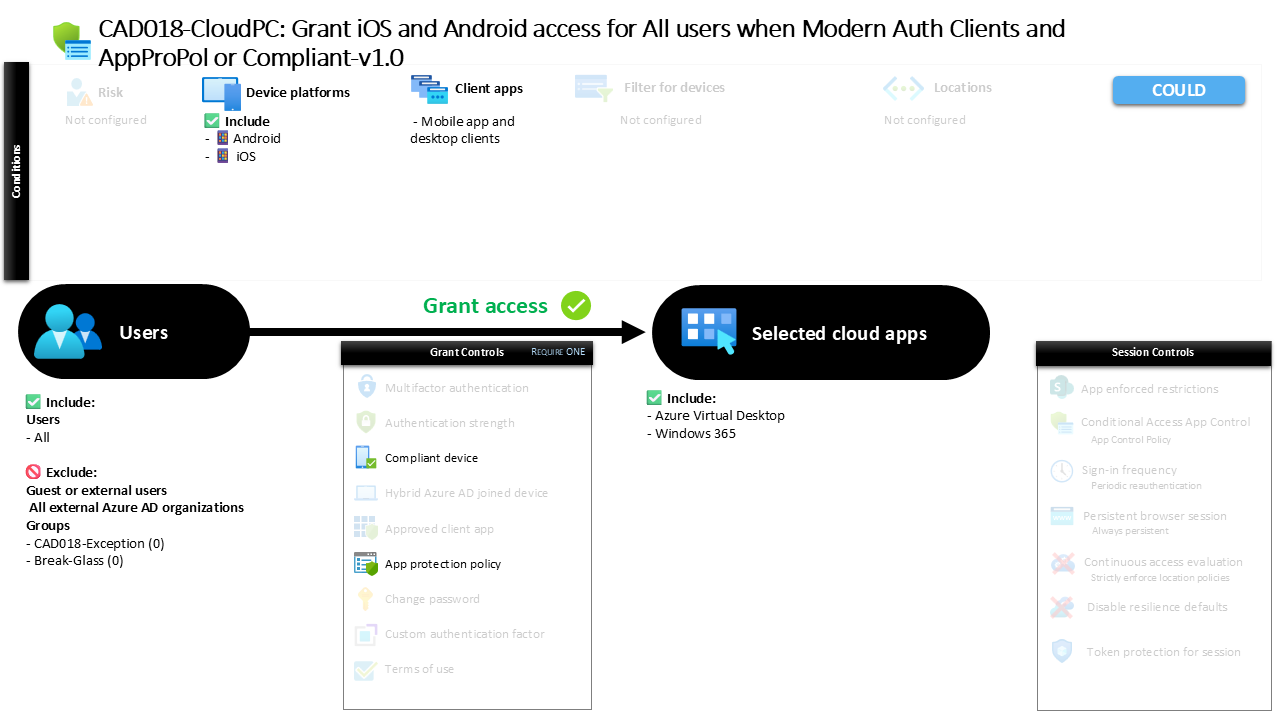
Conditional Access iOS Android Access Control CAD018-CloudPC: Grant iOS and Android access for All users when Modern Auth Clients and AppProPol or Compliant
Introduction
Conditional Access iOS Android access is often one of the first security challenges organizations face when enabling mobile productivity. Employees expect seamless access to cloud services from smartphones and tablets, yet mobile devices introduce a wide range of risks. Devices may be unmanaged, applications may store sensitive data locally, and authentication flows may vary depending on the client being used.
Conditional Access helps solve this challenge by evaluating the context of every sign-in before access is granted. Instead of treating all mobile devices the same, organizations can require specific security conditions before users are allowed to connect to corporate services.
This policy represents a mobile access control design focused on modern mobile authentication. The configuration evaluates mobile sign-ins coming from iOS and Android devices and ensures that access is only allowed when security requirements related to device compliance or application protection are satisfied. In practice, this creates a controlled mobile access environment where security posture is verified before productivity is enabled.

This Policy in One Line
This Conditional Access policy allows mobile access from iOS and Android devices only when the device is compliant or the application used to access corporate services is protected by application protection policies.
The design focuses specifically on modern authentication clients on mobile platforms. When a user attempts to access protected cloud services from a mobile device, Conditional Access evaluates whether the device or the application meets the required security posture.
If the security requirement is satisfied, access proceeds normally. If neither requirement is met, access is denied.
This approach enables organizations to support mobile productivity while maintaining strict security standards for corporate data.
What This Conditional Access Policy Does
The purpose of this policy is to enforce security conditions for mobile access to selected cloud services. When users attempt to sign in from supported mobile platforms, Conditional Access evaluates the session before allowing access to proceed.
The policy specifically targets modern authentication clients used by mobile applications and desktop clients. These authentication flows are common for mobile productivity applications and modern cloud-connected clients.
During sign-in, Conditional Access checks whether the device is recognized as compliant with organizational device security requirements. Alternatively, the system evaluates whether the application being used is governed by application protection policies that control how corporate data is handled within the app.
Because the policy allows either condition to satisfy the requirement, organizations can support both fully managed devices and protected applications. This flexibility allows secure mobile access even when users work on devices that are not fully managed by the organization.
Who the Policy Applies To
This policy applies broadly across the user population. The configuration is designed to protect mobile access scenarios without limiting the scope to a specific department or user segment.
At the same time, external identities are not included within the scope of the policy. Access scenarios involving external collaboration or guest access follow different security evaluation paths.
In addition to that design decision, organizations typically maintain specific exclusion groups that allow administrators to manage controlled exceptions. These groups are often used for testing, staged deployments, or operational troubleshooting where Conditional Access policies must temporarily be bypassed under controlled circumstances.
By combining wide user coverage with structured exclusions, the policy balances strong protection with operational flexibility.
What Apps and Services the Policy Protects
This policy targets a defined set of cloud applications. These services represent workloads where mobile access is commonly required and where sensitive corporate data may be accessed from mobile devices.
Conditional Access evaluates access attempts to these applications whenever authentication occurs through supported client applications. If a user attempts to open the service from a mobile application that relies on modern authentication, the policy immediately becomes part of the sign-in evaluation process.
This ensures that the mobile security requirements defined in the policy apply consistently whenever users interact with the protected services.
By focusing on specific applications rather than applying a blanket rule across all services, the organization can tailor mobile security controls to workloads where mobile access presents the greatest risk.
Platforms, Devices, and Client Apps in Scope
The policy specifically targets mobile platforms running iOS and Android. These platforms represent the dominant mobile operating systems used in enterprise environments and are therefore central to mobile access security strategies.
When a sign-in originates from a device running either of these operating systems, Conditional Access evaluates the request against the policy conditions. The evaluation applies only when authentication occurs through modern authentication clients, which are commonly used by mobile productivity applications.
Legacy authentication mechanisms are not part of this policy’s evaluation scope. Instead, the policy focuses on modern authentication flows where Conditional Access can enforce advanced security requirements.
By restricting the scope to modern authentication clients on mobile platforms, the design ensures that the security conditions are applied to the most common and relevant mobile access scenarios.
How Access Is Decided
The decision process defined in this policy relies on a flexible grant control model. Conditional Access evaluates two possible security signals and allows access if either of them is satisfied.
The first condition checks whether the mobile device meets the organization’s device compliance requirements. Device compliance is typically evaluated through mobile device management systems that verify factors such as device encryption, operating system status, and security posture.
The second condition evaluates whether the application being used is governed by application protection policies. These policies enforce controls within the application itself, such as restricting how corporate data can be stored or transferred.
Because the policy accepts either condition, users can gain access through a compliant device or through a protected application environment. This dual-path design enables secure access while accommodating different device management scenarios.
What the User Experience Looks Like During Sign-In
From a user perspective, the experience is typically seamless when the device or application already meets the required conditions.
For example, a user opening a corporate mobile application on a compliant device may not notice any additional prompts. Conditional Access evaluates the device status in the background and allows the sign-in to proceed.
If the device is not compliant but the application is protected by application protection policies, the session can still proceed because the security requirement is satisfied through the application environment.
However, if neither condition is met, the user will encounter an access restriction. At that point, the user may be required to enroll the device or access the service through an application that supports the required protection policies.
This approach guides users toward secure mobile access paths while keeping the sign-in experience simple whenever security requirements are already satisfied.
Why This Policy Matters for Security and the Business
Mobile devices have fundamentally changed how employees interact with corporate services. Work no longer happens exclusively from managed desktops inside corporate networks.
Instead, users regularly access cloud services from smartphones and tablets that may be personal devices, temporary devices, or devices outside the direct control of the organization.
Without Conditional Access, these mobile access scenarios would introduce significant security exposure. Corporate data could be accessed from devices with unknown security posture or from applications that do not protect corporate information.
This policy addresses that risk directly. By enforcing either device compliance or application protection, the organization ensures that mobile access always occurs within a controlled security boundary.
As a result, the business can support flexible mobile work while maintaining strong protection for corporate data.
Is This a Foundational or Must-Have Policy?
This type of policy is commonly considered a foundational mobile security control in modern Microsoft Entra environments.
Mobile productivity is a standard expectation for most organizations. Users rely on mobile access for email, collaboration, and cloud-based applications throughout the workday.
Because of this widespread usage, controlling mobile access conditions becomes a critical component of identity security architecture.
Policies like this one establish a clear security baseline for mobile access. Instead of relying solely on device management or solely on application protection, the policy allows both approaches to support secure productivity.
This flexibility is particularly valuable in environments where both managed and unmanaged mobile devices coexist.
Important Design Choices and Things to Notice
One of the most important aspects of this policy is the use of a flexible grant requirement. Rather than enforcing a single security condition, the policy allows two different methods of satisfying the access requirement.
This reflects a common enterprise design approach where organizations support multiple device management models simultaneously.
Another important design choice is the platform targeting. By focusing on iOS and Android, the policy addresses the operating systems most commonly used for mobile productivity while avoiding unnecessary impact on other device categories.
The policy also relies on modern authentication client applications, which ensures that Conditional Access can evaluate security conditions during the authentication process.
Together, these choices create a balanced policy that protects mobile access without introducing unnecessary friction.
Conditional Access Design Principles Behind This Policy
This policy reflects several core design principles that guide Conditional Access architecture.
The first principle is context-aware access. Instead of granting access based solely on identity, Conditional Access evaluates additional signals such as device posture and application protection status.
The second principle is layered protection. By allowing both device compliance and application protection as valid security controls, the organization ensures that corporate data is protected regardless of the device ownership model.
Another key principle is user experience alignment. Security policies that disrupt productivity often lead to workarounds. This policy avoids that risk by allowing secure access paths that work naturally with mobile productivity applications.
These principles help organizations maintain strong identity security while supporting the flexibility required in modern work environments.
Final Thoughts
Mobile access will continue to play a central role in modern workplace productivity. As organizations rely more heavily on cloud services, the importance of secure mobile authentication will only increase.
Conditional Access provides the mechanism to enforce security decisions in real time during every sign-in. By evaluating device posture and application protection status, policies like this one ensure that mobile access occurs within a trusted environment.
The result is a balanced security model that supports both user productivity and data protection. Users can access the services they need from mobile devices, while the organization maintains confidence that access conditions meet defined security standards.
Policies like this represent a practical example of how Conditional Access enables secure mobility in Microsoft Entra environments.
