

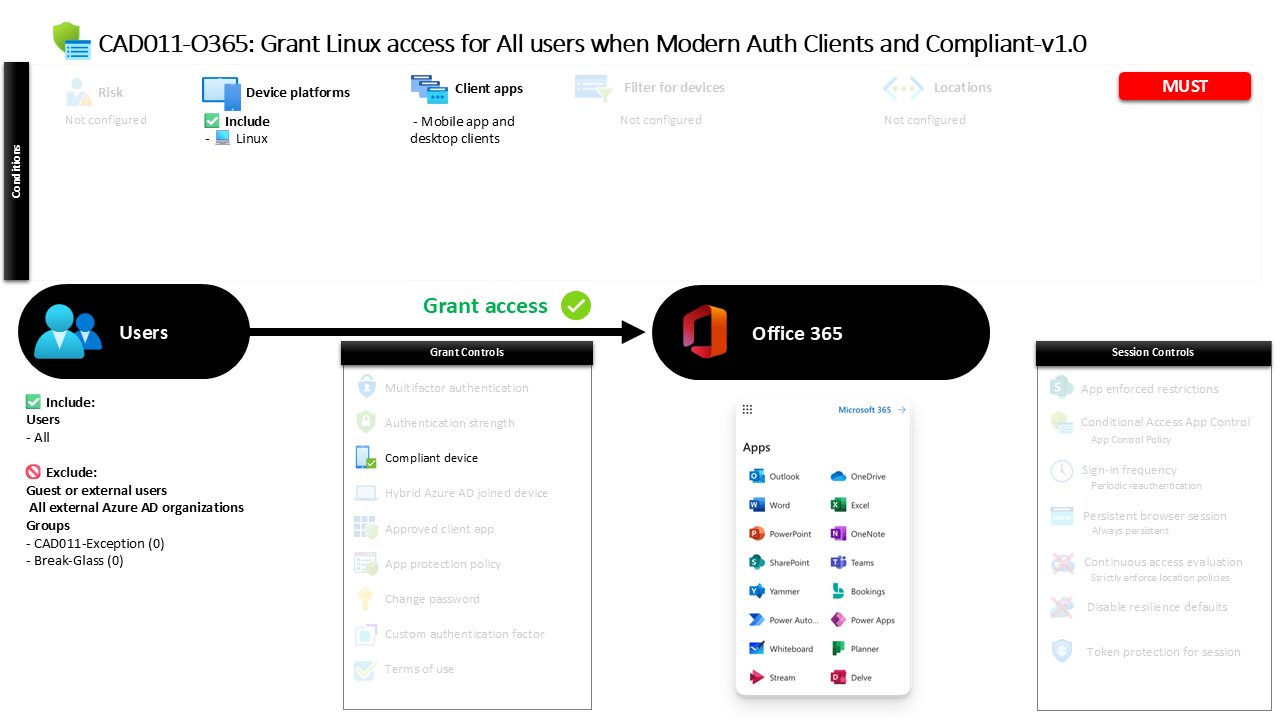
Conditional Access Linux Device Compliance CAD011-O365 Grant Linux access for All users when Modern Auth Clients and Compliant
Introduction
Conditional Access Linux device compliance becomes important the moment organizations begin supporting developers, engineers, or administrators who rely on Linux workstations. These devices often operate outside the traditional Windows management ecosystem, which can create uncertainty around device trust. Security teams need a way to allow legitimate Linux access while still ensuring the device meets corporate security standards.
This policy addresses that challenge directly. Instead of blocking Linux users or allowing unrestricted access, the design focuses on validating device compliance before access to productivity services is granted. The policy evaluates the platform being used, the type of client application involved in the sign-in process, and the compliance posture of the device.
The result is a Conditional Access configuration that enables Linux-based productivity while maintaining a clear security boundary. Only devices that meet the organization’s compliance requirements are permitted to access protected services, ensuring that device posture remains part of the identity verification process.

This Policy in One Line
This Conditional Access Linux device compliance policy allows Linux-based sign-ins to productivity services only when the device is recognized as compliant and the connection uses modern authentication desktop or mobile clients.
What This Conditional Access Policy Does
At its core, this policy introduces device trust validation for Linux systems that attempt to access productivity services. The policy evaluates the platform involved in the sign-in and applies security conditions specifically to Linux devices.
Rather than applying restrictions broadly across every operating system, the configuration isolates Linux as a distinct access scenario. This targeted design ensures that Linux users can still work productively while the organization maintains oversight of device security posture.
When a sign-in originates from a Linux platform and uses modern desktop or mobile client applications, Conditional Access evaluates whether the device meets the compliance standards defined by the organization. Only when the device satisfies those standards does access proceed.
This approach demonstrates a balanced Conditional Access design philosophy. Instead of treating Linux as inherently untrusted, the policy verifies device health before allowing access, reinforcing a security model where identity and device posture are evaluated together.
Who the Policy Applies To
The policy is designed to apply broadly across the user population. By targeting all users, the configuration ensures consistent enforcement of the device compliance requirement whenever Linux devices are used to access protected services.
However, the design also recognizes that operational flexibility is sometimes necessary. Certain accounts are excluded from the policy through group-based exclusions. Organizations commonly implement this model so that security teams can manage exceptions through controlled approval processes or time-based access mechanisms.
This approach avoids embedding permanent user-level exclusions directly into the policy. Instead, exception management can be handled through group membership, which provides administrative oversight and the ability to review or revoke exceptions when necessary.
From a Conditional Access architecture perspective, this reflects a best practice. Policies remain broadly applied, while exception handling is delegated to structured governance processes.
What Apps and Services the Policy Protects
The policy targets the organization’s productivity service environment within Microsoft’s cloud platform. These services typically include collaboration, communication, and document management workloads that are accessed through modern authentication clients.
By focusing on this service category, the policy ensures that device compliance becomes a prerequisite for accessing core business applications. This prevents unmanaged or non-compliant Linux systems from connecting directly to organizational data using desktop or mobile applications.
This targeted application scope reflects a common Conditional Access strategy. Rather than attempting to control every possible service, policies often prioritize high-value platforms where organizational data is stored or shared.
In this case, the policy ensures that when Linux devices attempt to interact with the productivity environment through modern clients, the device’s compliance status becomes a decisive factor in whether access is permitted.
Platforms, Devices, and Client Apps in Scope
This policy focuses specifically on the Linux operating system. When Conditional Access detects a sign-in originating from a Linux platform, the policy becomes active and begins evaluating additional conditions before granting access.
The configuration also limits the policy to modern desktop and mobile client applications. These clients rely on modern authentication protocols, which allow Conditional Access to evaluate device signals, identity context, and policy requirements during the authentication process.
By restricting the policy to modern authentication clients, the configuration avoids legacy authentication pathways that lack support for Conditional Access enforcement. This ensures that device compliance validation occurs as part of the authentication flow.
From a design standpoint, the combination of platform targeting and modern client application enforcement ensures that Linux device access is evaluated in a secure and predictable manner.
How Access Is Decided
The decision logic within this policy is straightforward but powerful. When a sign-in meets the defined conditions, Conditional Access evaluates whether the device is recognized as compliant.
A compliant device typically indicates that the system has met the organization’s device management and security requirements. Compliance signals may include configuration standards, security settings, or management enrollment status depending on how the organization defines compliance.
If the Linux device satisfies the compliance requirement, access to the targeted services proceeds normally. If the device fails to meet those standards, access is blocked until the device meets the compliance criteria.
This decision model reinforces the principle that identity alone is not sufficient to grant access. The device used during the sign-in must also demonstrate an acceptable security posture.
What the User Experience Looks Like During Sign-In
From the user perspective, the experience remains relatively straightforward. A user signs in to a productivity service from a Linux workstation using a supported modern client application.
During the authentication process, Conditional Access evaluates the device platform and confirms that the connection originates from Linux. Once this condition is confirmed, the policy checks the compliance status of the device.
If the device meets the organization’s compliance requirements, access continues normally and the user can interact with the service as expected. If the device is not compliant, the sign-in cannot proceed until the device satisfies the required security conditions.
This design ensures that users are not unnecessarily blocked from working on Linux devices, but it still enforces a clear security boundary based on device health.
Why This Policy Matters for Security and the Business
Linux endpoints are increasingly common in modern workplaces, particularly among development teams, security professionals, and technical staff. While these systems provide flexibility and power, they can introduce security risks when they fall outside standard device management frameworks.
This policy ensures that Linux devices are not automatically treated as trusted endpoints. Instead, they must meet the same device compliance standards expected from other managed systems before accessing business services.
For the business, this creates a consistent security model. Users can continue working on the platforms they prefer, but access to organizational resources remains governed by device trust requirements.
By combining identity verification with device compliance validation, the policy strengthens the overall Zero Trust security posture.
Is This a Foundational or Must-Have Policy?
This type of policy is often considered a foundational Conditional Access control for organizations that support Linux endpoints.
Without such a policy, Linux devices could potentially access cloud services without any evaluation of device posture. This creates a gap in the security architecture, especially when device compliance is already enforced for other platforms.
Introducing Conditional Access Linux device compliance closes that gap by extending device trust verification to Linux systems. It ensures that every platform interacting with business services is evaluated through the same security lens.
For organizations with mixed operating system environments, this policy plays a key role in maintaining consistent device governance.
Important Design Choices and Things to Notice
One important design decision is the focus on platform-specific enforcement. By targeting Linux directly, the policy avoids unnecessary impact on other operating systems while still securing the environment where Linux devices are used.
Another notable element is the use of modern authentication clients. This ensures that Conditional Access can evaluate the necessary signals during the authentication process and enforce the compliance requirement effectively.
The use of group-based exclusions also reflects a mature policy design. Instead of embedding permanent user exceptions, organizations can manage temporary or operational exceptions through controlled group membership.
Together, these design choices create a policy that is both precise and flexible.
Conditional Access Design Principles Behind This Policy
Several Conditional Access design principles are visible in this configuration.
First is platform targeting. Rather than applying uniform rules to every operating system, the policy isolates Linux as a specific scenario requiring device compliance validation.
Second is the enforcement of device posture. Access decisions are not based solely on identity credentials. The device itself must demonstrate that it meets the organization’s security standards.
Third is the use of modern authentication pathways. By limiting the policy to modern client applications, the design ensures that Conditional Access evaluation occurs reliably during the authentication process.
These principles align with a broader Zero Trust approach where identity, device health, and application access are evaluated together before granting entry.
Final Thoughts
Supporting Linux devices in a secure cloud environment requires thoughtful Conditional Access design. Simply allowing Linux access without verifying device posture can expose organizations to unmanaged endpoint risks.
This policy addresses that challenge by introducing Conditional Access Linux device compliance as a prerequisite for accessing productivity services through modern clients.
The result is a configuration that respects the flexibility Linux users need while ensuring that every device interacting with business services meets defined security standards.
By combining platform targeting, modern authentication, and device compliance evaluation, the policy strengthens both security posture and operational consistency across the organization.
