

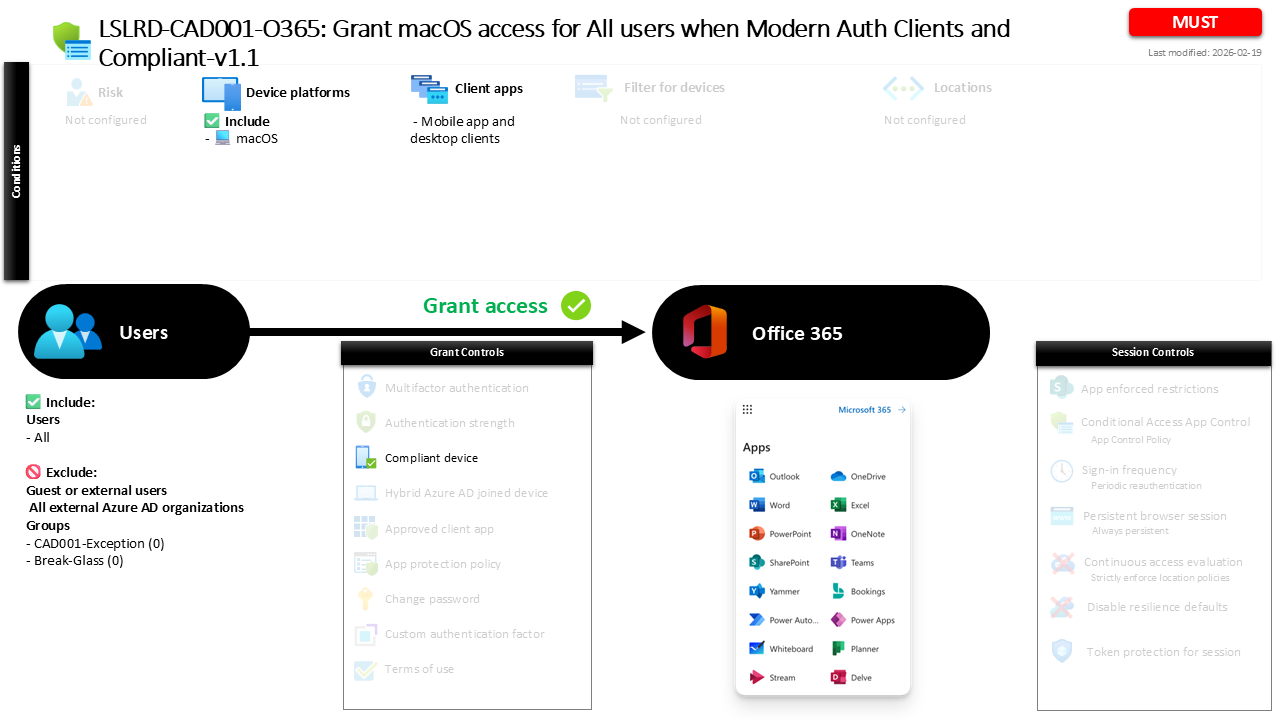
Conditional Access macOS Compliance for Office 365 CAD001-O365 Grant macOS access for All users when Modern Auth Clients and Compliant
Introduction
Conditional Access macOS compliance policies exist because modern workplaces rarely operate from a single device type or managed network. Employees access email, documents, and collaboration tools from laptops at home, shared workspaces, or coffee shops around the world. While this flexibility improves productivity, it also introduces a challenge for identity security teams. If unmanaged or insecure devices gain access to corporate resources, the organization loses control over the security posture of the endpoint handling sensitive data.
Conditional Access macOS compliance policies address this risk by tying access decisions to device health. Instead of trusting every login attempt from a supported platform, Microsoft Entra ID evaluates whether the device itself meets the organization’s security requirements. In this design, access to Office 365 services is permitted only when a macOS device is known to be compliant with management and security standards. The result is a practical balance between user productivity and endpoint trust, where device posture becomes a central part of the access decision.

This Policy in One Line
This Conditional Access macOS compliance policy allows users to access Office 365 from macOS devices only when those devices are marked as compliant and when access occurs through modern authentication clients.
What This Conditional Access Policy Does
This policy focuses on enforcing device trust when users attempt to access Office 365 services from macOS devices. Rather than allowing any macOS computer to authenticate successfully, Microsoft Entra ID evaluates whether the device has been registered, managed, and validated as compliant with the organization’s security configuration.
The enforcement mechanism relies on the compliant device requirement. When a sign-in attempt occurs from a macOS device through a supported modern authentication client, Conditional Access checks the device’s compliance status. If the device has been evaluated by device management and meets the defined security baseline, the sign-in can continue and the user gains access to Office 365 resources.
If the device does not meet compliance requirements, the sign-in is interrupted and access is not granted through this policy path. This approach ensures that endpoint configuration becomes a prerequisite for accessing productivity services, aligning device security with identity-based access control. In practice, it encourages organizations to standardize macOS management and ensures that corporate data remains accessible only from devices that meet security expectations.
Who the Policy Applies To
This policy is designed with broad coverage in mind and applies to all users within the organization. By targeting the entire internal user population, the design ensures consistent enforcement of device security standards across the workforce.
At the same time, the configuration intentionally avoids applying the rule to external collaboration identities. Guest and external users are not evaluated by this policy, which is a common Conditional Access design choice. External identities typically authenticate through their own organizations and may not have devices managed by the host tenant. Applying a device compliance requirement in those cases would often prevent legitimate collaboration scenarios.
The configuration also contains specific group exclusions. Organizations frequently use exclusion groups to support controlled exception management through approval workflows or temporary access scenarios. For example, these groups might contain emergency accounts, migration identities, or technical accounts that require different access handling. By structuring the policy in this way, the organization achieves broad protection while maintaining operational flexibility where necessary.
What Apps and Services the Policy Protects
The scope of this Conditional Access policy focuses on Office 365 services. These services include the core productivity workloads commonly used by organizations, such as email, collaboration platforms, document storage, and enterprise communication tools.
By applying the policy to this application scope, the organization ensures that access to its primary collaboration environment is governed by device trust. When a user attempts to open a mailbox, synchronize documents, or access collaboration tools from a macOS device, the Conditional Access engine evaluates whether the device meets compliance requirements before allowing the session to proceed.
This design reflects a typical security architecture pattern where productivity services represent the highest volume of user access activity. Protecting these services with device compliance ensures that the systems most frequently used by employees operate under strong endpoint trust controls. In effect, the policy strengthens the security boundary around the organization’s daily digital workspace.
Platforms, Devices, and Client Apps in Scope
This policy applies specifically to macOS devices and focuses on access initiated through modern authentication client applications. These clients include desktop or mobile applications that authenticate directly with Microsoft Entra ID using modern authentication protocols.
When a sign-in attempt originates from such a client on macOS, Conditional Access evaluates the request against the platform condition defined in the policy. Because the configuration explicitly targets macOS, other operating systems fall outside the evaluation scope for this particular rule.
Restricting the policy to macOS devices reflects a targeted security strategy. Different operating systems often require separate Conditional Access policies because device management capabilities, security posture evaluation, and compliance frameworks vary between platforms. By isolating macOS within its own policy, the organization can apply platform-specific security controls without affecting access decisions for other device types.
How Access Is Decided
Access decisions in this policy revolve around a single condition: whether the macOS device is marked as compliant. Device compliance is determined through device management systems that assess security posture based on configuration standards defined by the organization.
During the sign-in process, Microsoft Entra ID receives device information from the authentication request and checks whether the device is known and compliant. If the device meets the defined compliance requirements, the Conditional Access evaluation succeeds and the user is allowed to access Office 365 services.
If the device fails this evaluation, the sign-in cannot satisfy the policy requirements. This design ensures that authentication alone is not sufficient to access corporate workloads. Instead, both identity verification and endpoint security posture must align before access is granted. This layered decision model represents a core principle of Conditional Access security design.
What the User Experience Looks Like During Sign-In
From a user perspective, the sign-in experience remains straightforward when the device already meets compliance requirements. A user launches a modern authentication client on their macOS device and signs in using their organizational credentials. Conditional Access performs the compliance check in the background, and if the device meets the required posture, access proceeds normally.
If the device is not compliant, the experience changes. The user may encounter a message indicating that access requires the device to meet organizational security requirements. In practice, this typically means the device must be enrolled in device management and evaluated against the compliance baseline.
This interaction is intentional. Conditional Access policies are designed not only to block insecure access but also to guide users toward secure device configurations. By connecting access approval to device health, the organization encourages consistent endpoint management while maintaining a smooth experience for compliant users.
Why This Policy Matters for Security and the Business
From a security perspective, enforcing device compliance significantly reduces the risk associated with unmanaged endpoints. Devices that lack encryption, security updates, or required configuration settings represent potential entry points for attackers or data leakage. By requiring compliance before granting access to Office 365, the organization ensures that endpoints interacting with business data meet established security standards.
From a business standpoint, the policy also simplifies governance. Instead of relying on manual oversight or informal device policies, the organization embeds its device standards directly into the access control layer. Users automatically comply with security requirements because access depends on meeting them.
This approach transforms device management from a background IT function into a critical element of identity security architecture. Conditional Access acts as the enforcement engine that ensures those device standards actually influence real-world access behavior.
Is This a Foundational or Must-Have Policy?
Policies that require compliant devices for productivity services are widely considered foundational in modern Conditional Access deployments. They establish a direct relationship between endpoint management and access control, ensuring that device health is always part of the authentication decision.
For organizations supporting macOS devices, this type of policy becomes particularly important. macOS adoption continues to grow across many industries, and unmanaged laptops can easily become an overlooked security gap if not properly integrated into device management strategies.
By implementing a Conditional Access macOS compliance policy, the organization ensures that macOS endpoints follow the same security expectations applied to other corporate devices. This alignment strengthens the overall Zero Trust architecture and closes potential gaps between device platforms.
Important Design Choices and Things to Notice
Several design choices in this policy highlight thoughtful Conditional Access architecture. First, the policy specifically targets macOS devices rather than applying a universal device rule across all platforms. This allows the organization to tailor device security requirements according to platform-specific management capabilities.
Second, the policy focuses on modern authentication clients. Modern authentication provides richer identity and device signals compared to legacy authentication mechanisms. By aligning the policy with modern authentication clients, the organization ensures that Conditional Access receives the necessary information to evaluate device compliance accurately.
Finally, the policy integrates device compliance as the access requirement rather than introducing additional authentication controls. This indicates that the primary objective of the rule is endpoint trust rather than identity verification. In many Conditional Access designs, device compliance and identity protections complement each other through multiple policies working together.
Conditional Access Design Principles Behind This Policy
At a strategic level, this policy reflects several core Conditional Access design principles. One of the most important is the concept of device trust. In modern security architectures, verifying the identity of the user is only part of the access decision. The security posture of the device must also be considered before granting access to sensitive services.
Another principle demonstrated here is platform-specific policy design. Conditional Access allows organizations to define separate rules for different operating systems, enabling more precise security control. This modular approach simplifies troubleshooting and ensures that each platform receives appropriate protection.
The policy also aligns with Zero Trust thinking. Rather than assuming that any authenticated user device is trustworthy, the organization verifies the device state before granting access. Every sign-in becomes a verification event, reinforcing the idea that trust must be continuously validated.
Final Thoughts
Conditional Access macOS compliance policies play a key role in modern identity security strategies. As organizations embrace diverse device ecosystems and flexible work environments, the ability to validate endpoint security before granting access becomes essential.
By linking Office 365 access to compliant macOS devices, this policy ensures that corporate data is handled only by endpoints that meet defined security standards. The result is a practical and scalable approach to balancing productivity with security.
For organizations building a mature Conditional Access architecture, policies like this form an essential building block. They integrate device management, identity protection, and application access into a single enforcement framework, strengthening both operational security and user experience.
