

Conditional Access Sign-In Frequency Policy CAD007 O365 Session Set Sign-in Frequency for Apps for All Users When Modern Auth Clients and Non-Compliant
Introduction
Conditional Access sign-in frequency exists to solve a common security challenge: authentication sessions that last too long on devices the organization cannot fully trust. When users sign in once and remain authenticated for extended periods, the risk window grows if the device becomes lost, shared, or compromised. Conditional Access provides session controls that allow organizations to periodically require users to verify their identity again.
This policy applies that concept to mobile and desktop Office applications running on Android and iOS devices when those devices are not considered compliant or trusted. Rather than permanently blocking access, the design introduces a controlled balance between usability and security by periodically forcing reauthentication.
From a security architecture perspective, this type of policy demonstrates how Conditional Access session management can reduce persistent authentication risks while still allowing productivity from personal or unmanaged devices.

This Policy in One Line
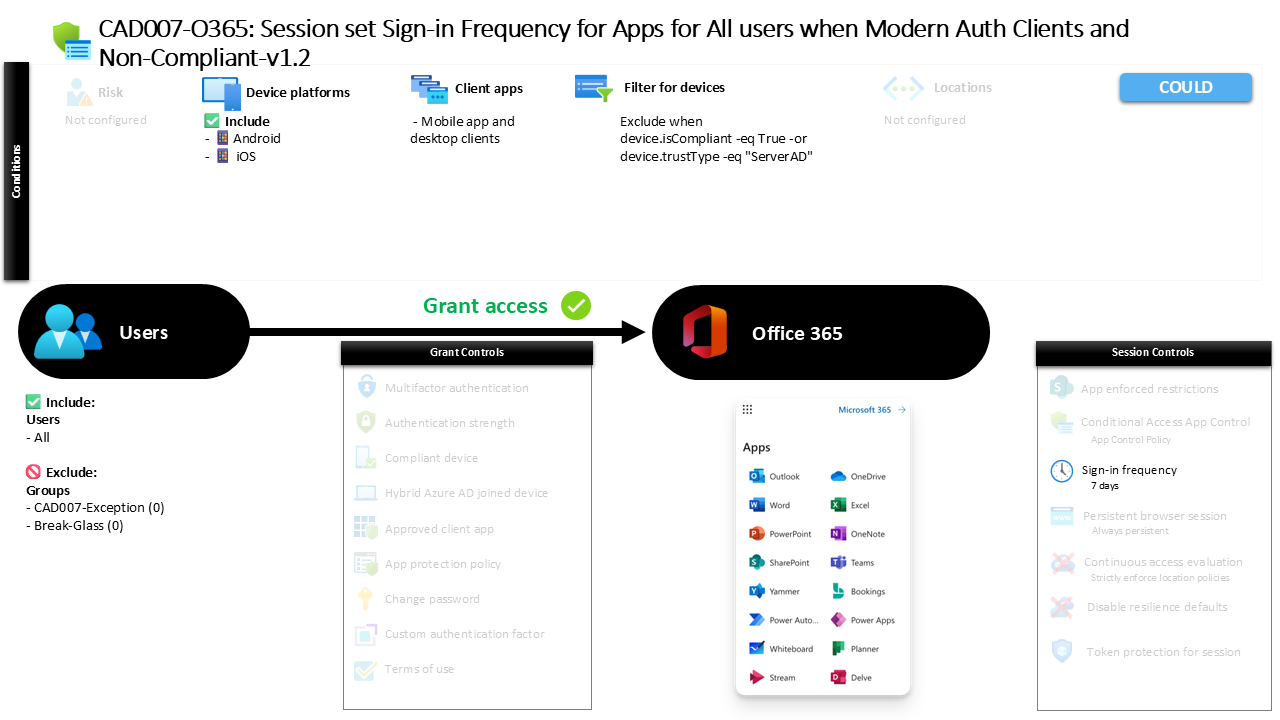
This Conditional Access sign-in frequency policy requires users accessing Office 365 through mobile or desktop applications on Android or iOS devices to reauthenticate every seven days when the device is not compliant or trusted.
What This Conditional Access Policy Does
The core purpose of this policy is to introduce session lifetime control for Office 365 access from mobile application environments where device trust cannot be guaranteed. Instead of relying solely on the initial authentication event, the policy periodically forces the identity platform to request authentication again.
The configuration specifically applies a sign-in frequency of seven days. This means that after a successful authentication event, the user’s session remains valid for up to one week. Once that time interval expires, the next interaction with the service requires the user to authenticate again.
Importantly, this control affects both primary and secondary authentication events. When the session refresh occurs, the identity platform may require both the user’s primary credentials and any additional authentication factors configured in the environment.
From a design standpoint, this creates a predictable authentication cadence that reduces the risk of long-lived authentication tokens on devices that the organization does not fully manage.
Who the Policy Applies To
The policy is designed to evaluate authentication events for the entire user population. Every user account is included in the scope of the evaluation, ensuring consistent security behavior across the tenant.
At the same time, two security groups are excluded from the policy evaluation. Organizations often maintain such exclusion groups to support controlled exception management. These groups are typically used for scenarios such as break-glass accounts, emergency access identities, or temporary operational exceptions approved through administrative workflows.
By including the broad user population while allowing controlled exclusions, the policy achieves two important design goals. It enforces a consistent authentication standard while still enabling administrators to manage exceptional scenarios without disrupting operational continuity.
This structure reflects a common Conditional Access design pattern where policies apply broadly but allow carefully governed exceptions for resilience and administrative control.
What Apps and Services the Policy Protects
The policy specifically targets Office 365 cloud services. This means the session control is evaluated when users access workloads such as Exchange Online, SharePoint Online, Teams, and other Microsoft 365 services that authenticate through the Office 365 application identifier.
Because Office 365 services rely on modern authentication and token-based access, session lifetime management becomes an important security capability. Authentication tokens issued to client applications can remain valid for extended periods unless Conditional Access introduces controls that shorten their lifespan.
By applying the sign-in frequency session control to Office 365, the organization ensures that mobile productivity applications do not maintain long-lived sessions on devices that may not meet device trust standards.
The result is a consistent access control model across Microsoft 365 services where authentication freshness is enforced periodically.
Platforms, Devices, and Client Apps in Scope
This policy evaluates access attempts originating from mobile application environments running on Android and iOS platforms. These platforms are commonly used for corporate productivity access through Outlook, Teams, OneDrive, and other Microsoft 365 applications.
The client application condition specifically targets mobile apps and desktop clients that use modern authentication. These client types rely on OAuth-based authentication tokens, which makes session controls like sign-in frequency particularly relevant.
A device filter further refines the policy scope. Devices that are compliant or recognized as trusted Active Directory–joined devices are excluded from the evaluation. In practice, this means the policy focuses primarily on devices that do not meet organizational device compliance or trust standards.
This targeting approach ensures that managed and trusted devices can maintain a smoother authentication experience, while devices outside that trust boundary are required to revalidate identity more frequently.
How Access Is Decided
During the sign-in evaluation process, Microsoft Entra ID first determines whether the authentication event matches the conditions defined in the policy. The system evaluates the user identity, the application being accessed, the client application type, the device platform, and the device trust characteristics.
If the user attempts to access Office 365 using a mobile or desktop application from an Android or iOS device that is not compliant and not recognized as a trusted directory device, the policy conditions are satisfied.
At that moment, the session control becomes active. Rather than immediately blocking access or demanding additional requirements, the policy influences the authentication session lifetime.
The identity platform tracks the elapsed time since the last successful authentication event. Once the seven-day interval is reached, the next access request triggers a new authentication challenge.
This mechanism allows Conditional Access to manage authentication freshness without interrupting normal user productivity unnecessarily.
What the User Experience Looks Like During Sign-In
From a user perspective, the behavior of the policy is subtle but noticeable over time. A user may sign in to Outlook on an iPhone or Android device and continue using the application normally for several days without interruption.
During this time, authentication tokens remain valid and allow seamless interaction with Microsoft 365 services. The user may open email, sync calendars, and access files without repeatedly entering credentials.
However, once the seven-day authentication interval expires, the next interaction with the service triggers a new sign-in prompt. At that point, the user must authenticate again before access continues.
Because the policy applies to both primary and secondary authentication, the reauthentication event may require both the user’s password and additional verification steps depending on the organization’s authentication configuration.
This periodic verification helps ensure that the person using the device is still the legitimate account holder.
Why This Policy Matters for Security and the Business
Persistent authentication sessions can introduce risk when users access corporate data from personal or unmanaged devices. Mobile devices are easily misplaced, shared within households, or used across multiple personal accounts.
Without session controls, a valid authentication token could potentially grant access to corporate services long after the original authentication event occurred. This creates a window where unauthorized access could occur without additional identity verification.
By enforcing a seven-day sign-in frequency for devices that do not meet compliance or trust standards, the organization reduces that risk window significantly.
At the same time, the policy avoids creating excessive friction for users. Instead of forcing authentication at every access attempt, it establishes a predictable interval that balances usability with security assurance.
This type of session control reflects a practical Zero Trust approach where identity must be periodically revalidated when device trust is uncertain.
Is This a Foundational or Must-Have Policy?
Session management policies like this one are typically considered foundational in mature Conditional Access architectures. They complement authentication controls such as multifactor authentication by ensuring that authentication events remain fresh.
In environments where employees frequently access corporate data from smartphones and tablets, the risk associated with unmanaged devices becomes a significant design consideration.
A Conditional Access sign-in frequency policy helps address this risk without forcing organizations to block mobile access entirely. Instead, it introduces a controlled authentication lifecycle that reduces long-lived access tokens.
Many organizations adopt this type of policy early in their Conditional Access journey because it delivers measurable risk reduction while preserving the mobile productivity experience users expect from modern collaboration platforms.
Important Design Choices and Things to Notice
Several design choices within this policy reveal the architectural intent behind the configuration.
First, the policy targets only Android and iOS platforms. This suggests that mobile device access is the primary focus of the control.
Second, the device filter excludes compliant and trusted directory devices. This means the policy deliberately focuses on devices outside the organization’s managed device ecosystem.
Third, the session control affects both primary and secondary authentication events. This ensures that reauthentication is not limited to a simple password prompt but may involve the organization’s broader authentication framework.
Together, these design elements demonstrate a targeted security strategy. Instead of applying strict authentication controls everywhere, the policy focuses on scenarios where device trust is lower and session risk is higher.
Conditional Access Design Principles Behind This Policy
The policy reflects several key Conditional Access design principles that are common in modern identity security architectures.
One principle is risk-based access control. Devices that meet organizational compliance or trust standards are treated differently from devices that do not. This allows the organization to adapt authentication behavior based on device posture.
Another principle is session lifecycle management. Authentication should not be viewed as a one-time event but as an ongoing verification process. By limiting session duration, the organization ensures that identity verification remains recent.
A third principle is user experience balance. Security controls must protect data without making productivity tools unusable. A seven-day interval introduces regular verification while avoiding constant interruptions.
These principles align closely with Zero Trust identity strategies where access decisions continuously evaluate identity, device posture, and session integrity.
Final Thoughts
The Conditional Access sign-in frequency policy described here demonstrates how session controls can strengthen security without removing the flexibility of mobile access. Instead of blocking users on unmanaged devices, the organization introduces periodic authentication to maintain confidence in the user’s identity.
By targeting Office 365 mobile application access on Android and iOS devices that are not compliant or trusted, the policy focuses precisely on the scenarios where persistent sessions create the greatest risk.
The seven-day authentication interval represents a thoughtful balance between security assurance and user convenience. It shortens the lifetime of authentication sessions while still allowing employees to use mobile productivity applications effectively.
In mature Conditional Access designs, policies like this form an essential layer in a broader Zero Trust access model where identity verification is not a single moment but a continuous security practice.
