

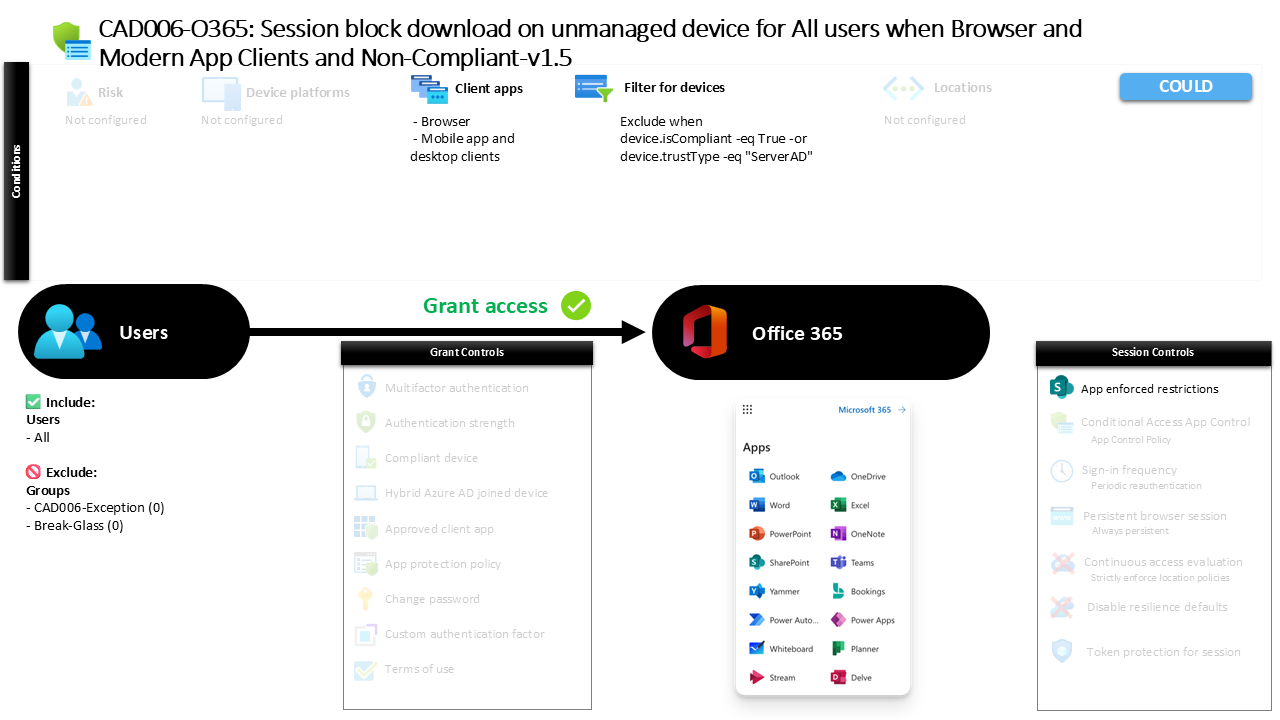
Conditional Access Unmanaged Device Download Control CAD006-O365 Session Block Download on Unmanaged Device for All Users When Browser and Modern App Clients and Non Compliant
Introduction
Conditional Access unmanaged device download control addresses a common security dilemma faced by modern organizations: users often access corporate data from devices that the organization does not manage or trust. That might be a personal laptop, a borrowed workstation, or a mobile device that has never been enrolled into device management. While productivity remains important, allowing unrestricted downloads from these devices introduces significant data leakage risk.
Conditional Access policies provide a way to manage that balance. Instead of blocking access completely, security architects often design policies that allow users to work with cloud services while preventing sensitive information from being stored locally on unmanaged endpoints. This design ensures that collaboration can continue while corporate data remains protected.
The policy explained in this article demonstrates exactly that approach. It evaluates whether a device meets organizational trust requirements and then applies application-level restrictions when those requirements are not met. The result is a carefully controlled session that protects data while maintaining user access to Microsoft 365 services.
This Policy in One Line
This policy applies Conditional Access unmanaged device download control by restricting file downloads in Microsoft 365 when users access services from devices that are not compliant or trusted.
What This Conditional Access Policy Does
At its core, this Conditional Access policy focuses on protecting organizational data when access originates from devices that fall outside the organization’s device trust boundary. Instead of preventing sign-in entirely, the policy introduces session restrictions designed to control how users interact with cloud services when device trust cannot be verified.
When a user signs in from an unmanaged or non-compliant device, the policy allows authentication to succeed but modifies the session behavior within Microsoft 365 services. Application-level restrictions are applied so that certain actions, particularly those that would transfer data from the cloud to the local device, are limited or blocked.
This design reflects a practical security philosophy. In many environments, completely blocking unmanaged devices would significantly disrupt legitimate workflows. By restricting downloads rather than denying access outright, the organization can reduce data exfiltration risk while still supporting web-based productivity scenarios.
The policy therefore acts as a guardrail rather than a hard barrier, enabling users to read or collaborate on information without allowing uncontrolled local copies of corporate data.
Who the Policy Applies To
The scope of this policy includes all users within the tenant environment. This broad targeting ensures that the data protection strategy applies consistently across the organization rather than focusing on a specific department or role.
At the same time, Conditional Access design often requires controlled exceptions. In this configuration, certain groups are excluded from the policy’s enforcement scope. Organizations commonly implement such exclusion groups to support operational requirements such as break-glass access, emergency recovery accounts, or highly controlled administrative workflows.
In practice, these exception groups are usually governed by strict access approval procedures or temporary elevation processes. The goal is to ensure that security controls remain strong for the majority of users while still allowing carefully managed exceptions when operational continuity requires them.
By applying the policy broadly and managing exceptions deliberately, the organization achieves both security consistency and operational flexibility within the Conditional Access framework.
What Apps and Services the Policy Protects
The policy focuses on protecting cloud productivity services that store and deliver organizational data. These services commonly include collaboration platforms, document storage systems, messaging environments, and other applications that form the backbone of the modern Microsoft 365 workspace.
From a security perspective, these services represent a high-value data surface. Documents, email attachments, shared files, and collaborative content frequently contain sensitive or business-critical information. When accessed from unmanaged devices, the risk is not authentication failure but uncontrolled data distribution.
Conditional Access therefore introduces session restrictions at the application layer. Instead of relying solely on device trust enforcement, the applications themselves apply limitations that control how content can be handled during the session.
This approach shifts the focus from identity verification alone toward data protection during active usage. The result is a layered security model where identity, device trust, and application behavior work together to safeguard information.
Platforms, Devices, and Client Apps in Scope
The policy evaluates access originating from both browser sessions and modern client applications. This means the policy is not limited to traditional web access but also evaluates authentication events from desktop applications and mobile clients that use modern authentication protocols.
Device trust plays a central role in the evaluation process. The configuration distinguishes between devices that meet organizational compliance requirements or are recognized as trusted devices and those that do not meet those criteria. Devices that are compliant or trusted fall outside the scope of this restriction logic.
Devices that do not satisfy those conditions are treated as unmanaged endpoints. When such devices initiate authentication, Conditional Access continues the sign-in process but applies additional controls to the session.
This selective targeting ensures that fully managed corporate devices maintain normal functionality while unmanaged devices are subject to tighter restrictions designed to protect organizational data.
How Access Is Decided
Conditional Access evaluates several signals during the authentication process before determining how a session should proceed. In this configuration, the most important factor is device trust.
If a device is compliant with organizational policies or recognized as a trusted domain-joined device, the policy does not apply its restrictions. The user continues their session without modification because the device meets the organization’s established trust standards.
If the device does not meet those requirements, Conditional Access identifies the session as originating from an unmanaged device. Rather than blocking the user, the system applies application-level restrictions that limit the ability to download or locally store data from cloud services.
This conditional decision process is a hallmark of modern Zero Trust architecture. Access is not simply granted or denied. Instead, the system continuously evaluates context and adapts session behavior to reduce risk while preserving productivity.
What the User Experience Looks Like During Sign-In
From the user’s perspective, the sign-in experience initially appears normal. The authentication process completes successfully, and access to cloud services is granted. However, once the session begins, the user notices certain restrictions when interacting with files and documents.
For example, a user accessing documents through a browser on an unmanaged laptop may be able to view or edit content directly in the web interface but will find that downloading the file to the local device is restricted. The application interface communicates these limitations clearly so that users understand the restriction is tied to device trust.
Users working from managed and compliant devices experience no such limitations. Their sessions allow full functionality, including the ability to download and locally store files.
This consistent and predictable behavior reinforces the organization’s security model. Users quickly learn that trusted devices provide full access while unmanaged devices are limited to controlled, browser-based interaction.
Why This Policy Matters for Security and the Business
Data leakage through unmanaged devices is one of the most common risks facing cloud-first organizations. Employees, contractors, and partners increasingly work from personal devices or temporary environments that fall outside centralized device management.
Without protective controls, these environments allow sensitive corporate data to be copied, stored locally, or transferred outside the organization’s control. Over time, this creates a growing shadow footprint of corporate information across unmanaged endpoints.
By implementing Conditional Access unmanaged device download control, organizations significantly reduce this risk. Sensitive content remains inside controlled cloud environments, even when accessed from less trusted devices.
At the same time, employees retain the ability to work with information through secure web sessions. This balance between usability and protection represents one of the most practical applications of Conditional Access within Microsoft Entra ID security architecture.
Is This a Foundational or Must-Have Policy?
This type of policy is widely considered a foundational component of a mature Conditional Access strategy. It directly addresses one of the most common scenarios in modern workplaces: accessing corporate resources from devices that the organization does not manage.
Blocking such access entirely may be impractical in many environments. Remote work, partner collaboration, and flexible device usage are now part of everyday operations. As a result, security architectures must account for unmanaged devices without sacrificing usability.
Session-based restrictions provide an effective compromise. They protect data from uncontrolled distribution while still enabling secure collaboration.
For this reason, many organizations deploy similar policies early in their Conditional Access design journey, often alongside device compliance policies and multifactor authentication controls.
Important Design Choices and Things to Notice
Several important architectural decisions are visible in this configuration. First, the policy evaluates both browser sessions and modern authentication clients. This ensures that restrictions apply consistently across web interfaces, desktop applications, and mobile experiences.
Second, the policy differentiates between trusted and unmanaged devices using device trust signals. Rather than relying on user identity alone, the policy incorporates device posture into its access decision. This aligns closely with Zero Trust security principles.
Another key design choice is the use of application-enforced restrictions instead of a full access block. This allows organizations to maintain productivity while still protecting sensitive data from being copied to unmanaged endpoints.
Finally, the use of exclusion groups indicates a deliberate operational strategy. Carefully controlled exceptions allow administrators to maintain service continuity and emergency access while preserving strong protections for the broader user population.
Conditional Access Design Principles Behind This Policy
This policy reflects several fundamental Conditional Access design principles used in modern identity security architecture.
The first principle is context-based access control. Access decisions are influenced by device trust, allowing the system to adapt session behavior dynamically depending on the risk profile of the device.
The second principle is layered protection. Identity verification alone does not fully protect data. By combining identity signals with device trust and application session restrictions, the organization builds multiple defensive layers around sensitive information.
A third principle is usability-aware security. Instead of blocking access from unmanaged devices entirely, the policy allows controlled interaction with cloud services. This ensures that security measures support real-world productivity rather than creating unnecessary barriers.
Together, these principles demonstrate how Conditional Access can deliver both strong protection and practical usability in a cloud-centric workplace.
Final Thoughts
Conditional Access unmanaged device download control is a practical example of how organizations can apply Zero Trust principles to everyday productivity scenarios. Rather than focusing solely on who the user is, the policy evaluates the trustworthiness of the device used to access corporate services.
When that trust cannot be confirmed, the system adapts the session to reduce risk. Users can still collaborate and access information, but the ability to remove data from the protected cloud environment is restricted.
This approach helps organizations maintain control over their most valuable asset: their data. By combining identity signals, device trust evaluation, and application-level session restrictions, Conditional Access provides a flexible yet powerful security framework for the modern workplace.

