

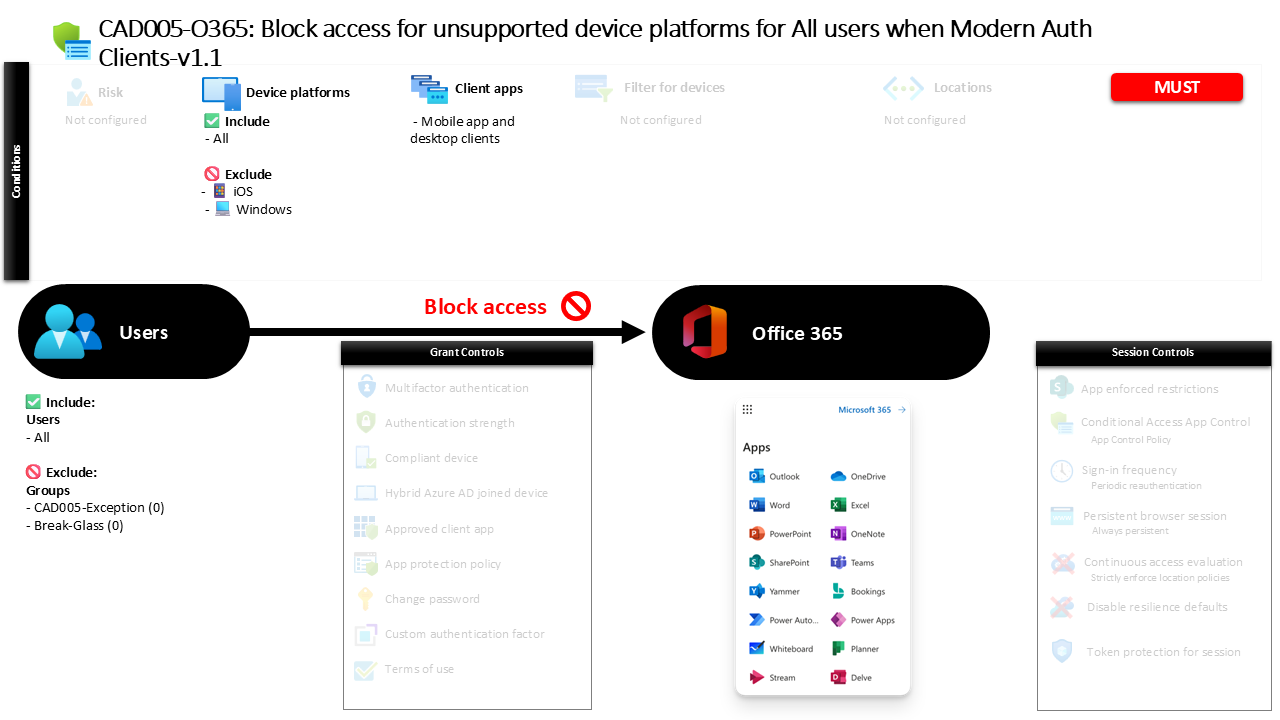
Conditional Access Unsupported Device Platforms CAD005-O365 Block Access for Unsupported Device Platforms for All Users When Modern Auth Clients
Introduction
Conditional Access unsupported device platforms policies address a subtle but important security challenge. Not every device that attempts to sign in to Microsoft 365 clearly identifies itself as a trusted operating system. Attack tools, outdated operating systems, embedded devices, or manipulated clients can sometimes appear as unknown platforms during authentication. When identity systems cannot confidently identify the device platform, organizations lose an important layer of security visibility.
This is where Conditional Access becomes a powerful defensive mechanism. Instead of trying to evaluate every possible device that might exist, organizations can define the platforms they trust and automatically block everything else.
This policy represents that design philosophy. Rather than focusing on known operating systems, it specifically targets devices that fall outside the recognized platform list. When a sign-in attempt originates from a device that does not match established operating systems, access to Microsoft 365 workloads through modern authentication clients is denied. The result is a simple but highly effective protection strategy that prevents unknown device platforms from interacting with enterprise cloud services.

This Policy in One Line
This Conditional Access unsupported device platforms policy blocks modern authentication access to Microsoft 365 services when a sign-in originates from an unidentified or unsupported operating system.
What This Conditional Access Policy Does
At its core, this policy acts as a defensive perimeter against unknown device platforms attempting to access Microsoft 365 using modern authentication clients. Conditional Access evaluates the platform information that is presented during the authentication process and compares it against the set of recognized operating systems.
In this configuration, the evaluation includes all platforms initially. The design then explicitly excludes widely supported enterprise operating systems such as Android, iOS, Windows, macOS, and Linux. This means that any device platform that does not fall into those recognized categories becomes the effective target of the policy.
When such a device attempts to authenticate using mobile applications or desktop clients, Conditional Access identifies that the platform falls outside the supported list. The access decision is then straightforward. Instead of allowing the sign-in to proceed, the policy instructs Microsoft Entra ID to deny access.
From a security architecture perspective, this approach eliminates uncertainty. If the platform cannot be confidently identified as one of the approved operating systems, the safest response is to block the request entirely.
Who the Policy Applies To
The scope of this policy is intentionally broad. It evaluates authentication attempts from all users within the organization. By applying the rule at this level, the design ensures that platform validation becomes a universal security control rather than something limited to specific departments or user categories.
At the same time, the configuration allows for controlled operational flexibility. Certain groups are excluded from the enforcement scope. In many organizations, such exclusions are used to support controlled exception management. Security teams may use them for troubleshooting scenarios, controlled testing, emergency access accounts, or specialized workloads that require different access conditions.
This structure reflects a common Conditional Access design pattern. Broad security coverage ensures that protections apply consistently across the identity estate, while limited exclusions allow administrators to maintain operational agility without weakening the overall security posture.
The result is a policy that protects the majority of the environment while still enabling controlled exception handling where necessary.
What Apps and Services the Policy Protects
This policy focuses specifically on protecting Microsoft 365 services accessed through modern authentication mechanisms. These services represent some of the most critical collaboration and productivity workloads within an organization’s cloud environment.
By placing platform restrictions around these services, the organization ensures that authentication attempts from unrecognized operating systems cannot interact with sensitive data, collaboration tools, or enterprise communication platforms.
The design also reflects the growing reliance on modern authentication protocols. Mobile applications and desktop clients that integrate with Microsoft 365 typically use these authentication flows. Because of this, platform validation becomes an important part of the access decision.
Blocking unsupported platforms at this stage ensures that access to Microsoft 365 workloads occurs only from devices running recognized operating systems. This improves both security visibility and trust in the device environment that interacts with the organization’s cloud services.
Platforms, Devices, and Client Apps in Scope
The platform evaluation logic in this policy is particularly important. Conditional Access begins by considering all possible device platforms that might appear during authentication. This broad evaluation ensures that every sign-in attempt is analyzed.
The configuration then excludes the commonly supported enterprise operating systems. Android, iOS, Windows, macOS, and Linux are treated as recognized platforms and are therefore not affected by the blocking rule.
The practical effect is that only unsupported or unidentified platforms fall within the enforcement scope. These may include obscure operating systems, devices that cannot correctly report their platform, or environments where platform information is missing or manipulated.
The client application scope further refines this evaluation. The rule applies specifically to mobile applications and desktop clients that authenticate using modern authentication protocols. These client types represent the most common methods through which users interact with Microsoft 365 services outside of browser sessions.
Together, these conditions create a focused control that blocks only unsupported platforms while allowing recognized operating systems to continue operating normally.
How Access Is Decided
When a user attempts to authenticate using a modern authentication client, Microsoft Entra ID evaluates several attributes of the request. One of those attributes is the device platform that the client reports during the sign-in process.
Conditional Access compares this platform information with the list of supported operating systems defined in the policy. If the platform matches a recognized operating system such as Windows, macOS, iOS, Android, or Linux, the request falls outside the enforcement scope and the evaluation continues normally.
However, if the platform does not match any of those recognized systems, the request enters the policy’s enforcement path. At this stage, the decision logic becomes very simple. The policy contains a grant control that blocks access entirely.
This means that the authentication process is stopped before the user can reach the protected service. The user receives a message indicating that the sign-in cannot proceed under the current access conditions. From a security standpoint, this ensures that unrecognized device platforms never establish a session with Microsoft 365 services.
What the User Experience Looks Like During Sign-In
For users operating from supported devices, the experience remains completely unchanged. Because their operating system matches one of the recognized platforms, the policy does not affect their authentication process. They sign in as usual using their mobile or desktop applications.
The experience changes only when a device presents itself as an unsupported platform. In that scenario, the authentication request is evaluated by Conditional Access and identified as falling within the restricted platform category.
At that point, the authentication process stops and access is denied. The user receives a notification explaining that the sign-in cannot continue because the device does not meet the organization’s access requirements.
From the user’s perspective, this often acts as an indicator that the device environment may not be supported by the organization’s security standards. In many cases, the solution is simply to use a device running a recognized operating system.
Why This Policy Matters for Security and the Business
Unknown device platforms create uncertainty in identity-driven security environments. When organizations cannot confidently determine what operating system is interacting with their services, it becomes difficult to apply device-based security controls or evaluate risk accurately.
By blocking unsupported platforms, this policy removes that uncertainty. Only devices running recognized operating systems are allowed to interact with Microsoft 365 services through modern authentication clients.
This has several benefits. It reduces the attack surface exposed to automated tools or malicious software that might attempt to impersonate unknown platforms. It also strengthens device visibility across the environment, ensuring that platform-based access controls remain reliable.
For the business, this translates into stronger trust in the device ecosystem accessing corporate data. Security teams can focus their protection strategies on supported platforms rather than trying to manage unpredictable or unidentified environments.
Is This a Foundational or Must-Have Policy?
This type of Conditional Access control is typically considered a foundational platform security policy. While it may not be the first policy organizations deploy, it becomes increasingly important as cloud identity systems mature.
Many organizations begin their Conditional Access journey with policies that enforce multi-factor authentication or protect privileged accounts. Once those baseline protections are in place, platform validation becomes the next logical step.
Blocking unsupported operating systems ensures that the identity system interacts only with devices that fall within known and manageable platform categories. This helps create a more predictable security environment and simplifies the design of other Conditional Access controls.
As organizations expand their device-based security strategies, platform restrictions like this one become a natural and essential component of a mature Conditional Access architecture.
Important Design Choices and Things to Notice
One of the most interesting aspects of this policy is the way platform targeting is implemented. Rather than directly listing unsupported operating systems, the configuration includes all platforms and then excludes the recognized enterprise platforms.
This design simplifies policy management. Instead of constantly updating a list of unknown or risky operating systems, the policy simply defines what is trusted. Everything outside that trusted set is automatically treated as unsupported.
Another important design choice is the focus on modern authentication clients. Mobile applications and desktop clients are widely used for accessing Microsoft 365 workloads, making them a logical place to enforce platform restrictions.
Finally, the presence of controlled exclusions demonstrates a practical operational approach. Security policies must protect the environment while still allowing administrators to manage exceptions when necessary. This balance between strict enforcement and operational flexibility is a hallmark of effective Conditional Access design.
Conditional Access Design Principles Behind This Policy
Several core Conditional Access principles are reflected in this policy design. The first is the concept of positive platform identification. Security decisions become far more reliable when access is granted only to devices that clearly identify themselves as trusted operating systems.
The second principle is defensive default behavior. When the identity system encounters uncertainty about a device platform, the safest outcome is to block access rather than allow it.
Another key principle is targeted enforcement. Instead of affecting every authentication scenario, the policy focuses specifically on modern authentication clients accessing Microsoft 365 services. This ensures that the control operates where it delivers the most security value.
Together, these principles demonstrate how Conditional Access can enforce strong platform validation while remaining aligned with real-world operational needs.
Final Thoughts
Conditional Access unsupported device platforms policies represent a quiet but powerful layer of protection in modern cloud identity environments. By restricting access from unidentified operating systems, organizations eliminate a category of risk that often goes unnoticed.
The strength of this approach lies in its simplicity. Supported platforms continue operating normally, while anything outside that trusted set is automatically blocked. This creates a predictable and controlled access environment for Microsoft 365 services.
For security teams designing Conditional Access strategies, platform validation provides an important foundation. When identity systems can trust the device platforms interacting with them, every other access control becomes more effective.
