

Tenant-to-Tenant Migration Free ? or Do I Need to Buy Software
Time to read
Less than 1 minute
Minutes
The Question behind the question
Someone always asks it. Usually, it comes in the first workshop, sometimes even before that, buried in an Email chain that arrives before a kickoff meeting was ever scheduled.
“Do we actually need to buy software for this? Can’t we just do it with scripts?“
The question sounds like its about budget. And partly it is. But underneath it there is usually something else: a hope that it will be simpler then it looks. A desire to avoid a conversation with finance. Sometimes a genuine belief, held by someone who has moved data around before and found it straightforward, that tenant-to-tenant migration is essentially some kind of thing.
It is not. And the moment in the project when that becomes real is almost always the same moment: when someone draws the full picture on the whiteboard, and the room goes quiet.
What People Think Migration is
In most early conversations, the mental modal is transfer. Data lives in one place. You move it to another place.
And technically, yes. That is what happens. Data does move. But that framing misses almost everything that actually determines whether a migration succeeds or fails, and almost everything that determines how it it takes, how much its costs, and how much organizational disruptions lands on real people doing real work.
One thing worth understanding from the start: a tenant-to-tenant migration moves content, not identities. Users do not transfer, They have to be created, configured, and mapped in the target tenant before anything else can land correctly. That distinction sounds administrative until it is not, until someone discovers mid-project that permissions are broken, ownership is missing, and that content was supposed to move has nowhere to go on the other side.
Beyond identity, that permissions need to be re-added. Every share link, internal or external, has to be considered. Regulatory requirements shape what can be migrated, when, and in what sequence. The target environment has to be built, or accessed, or both. In a merger, you are often reaching into a production tenant that is already live and active, which introduces risks that is simply “copy the data” framing completely ignores.
And then there is the carve-out scenario, which is where things become genuinely complex in ways that are hard to explain until you have sat inside one. When an organization is being sold, and the buying party is a competitor, the migration cannot simply be a transfer. It has to be designed specifically to minimize the risk that sensitive information accidentally crosses the boundary before it is supposed to. Sometime that means a two-step process. Sometimes it means two separate projects that are coordinated but distinct. The timeline is almost always compressed, because both parties want the separation to happen fast, and fast migrations done without proper tooling are where things tend to break.
Where the Complexity Actually Lives
Before COVID, it was possible to request throttling increase from Microsoft for SharePoint migrations. That option is gone now. Usage across the platforms increased so substantially that Microsoft withdrew it. Which means that migrations that once could be accelerated to meet tight deadlines now have to work within limits that are fixed and not negotiable, and that affect every timeline conversation you have with stakeholders who remember how it used to work, or have heard from someone who did migration “years ago” and it was fine.
This kind of thing is not in scripts. It is not something a team discovers in advance when they decide to handle the migration manually. It surfaces during execution, when the timeline is already set and the business is already expecting a delivery date.
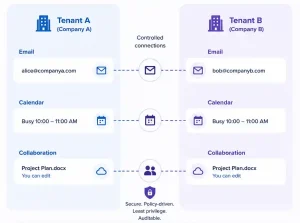
That is one example. There are many others. Coexistence is another one. In mergers and carve-out especially, there is often a period where both environments need to be operational simultaneously. Email needs to route correctly across both tenants. Calendar availability needs to be visible. People need to be able to collaborate without being fully merged. Setting that up manually, without tooling that is designed for it, is the kind of work that sounds manageable until it is not.
The Engineering Hours Nobody Budgets For
Manual migrations are not free. They are paid for in engineering time, and that time is rarely calculated honestly at the start.
Script have to be written. then tested. Then run in pilot. When something goes wrong during the pilot, which it will, the scripts have to be debugged, adjusted, and re-run. When a requirement changes mid-project, which it always does, the whole cycle start again.
And during the live migration itself, engineers have to monitor the process continuously, because nothing runs unattended without eventually encountering a problem that requires a human decision.
That monitoring time is invisible in a budget conversation. It shows up in actual hours, across actual weeks, billed internally or externally, and it accumulates. On top of that there is compliance risk. If something is not captured, if a regulation is missed, if data ends up somewhere it should not have, the cost of remediation is not a line item anyone planned for.
Proven migration tooling carries certain certifications like type 2 SOC 2, ISO 27001, it has been tested across environment that no internal team will replicate on their own, against edge cases that will become visible at scale or across specific configuration combinations. That is not a marketing point. It is the result of years of actual project exposure, which is something no script, however well written, can substitute for.
What the Tools Actually Do That Scripts Cannot
The thing that gets underestimated most consistently is not the data transfer itself. It is the visibility.
Dashboard, reporting, real-time progress monitoring across workloads, the ability to identify a failure and understand exactly what failed and why without manually parsing logs: these are the capabilities that determine how much a migration cost in engineering time, and how quickly problems get resolved when they occur.
When you are managing a migration across hundreds or thousands of users, across email and SharePoint and OneDrive and Teams, the ability to see the state of the entire migration at any moment is not luxury. It is the difference between a controlled process and a reactive one.
Microsoft has moved further in this direction in recent years, and native tooling has improved. There is now a per-user paid add-on from Microsoft that provides some orchestration and basic monitoring across certain workloads. For smaller, cleaner migrations it is worth knowing about. But is caries its own licensing cost, it is still maturing, and there are meaningful gaps in what it covers, particularly around shared content and hybrid scenarios. Third-party tooling built specifically for migrating at scale still offers substantially deeper reporting, incremental migration passes that allows you to pre-stage data before cutover, and coverage across workloads that native options do not reach.
There is also the hybrid configuration capability, which matters significantly in scenarios where not everything is moving at once, or where an on-premises component is still in scope. Native tools do not handle hybrid configurations. They do not provide the coexistence infrastructure that mergers require. These are not minor gaps in complex project. They are the gaps where scope expands and timelines slip.
Teams: The Migration Nobody is Ready For
This deserves its own section because the expectation gap here is consistent across almost every project.
Clients assume Teams will migrate like everything else. The channels will move, the messages will be there, the files will follow. That is not how its works.
There is a fundamental split inside Teams that most stakeholders are not aware of going in. Personal chats, groups chats, and meeting conversations sit in one category. Teams channels, with all their associated files and SharePoint-backed content, sit in an entirely different one. The first category can be migrated with the right tooling. The second does not move the same way, and in many scenarios, it does not move at all with any native Microsoft capability. That content stays in the source tenant unless it is handled through a separate process or third- party tooling designed for it.
That realization lands differently in different rooms. Sometimes it lands as frustration. Something it restructures the entire project scope. Sometimes it means a timeline that was already aggressive has to be renegotiated, and that conversation happens under pressure, with a go-llive date already communicated to the business.
This is where experience matters more than tooling alone. Knowing what questions to ask before the project begins, understanding the gaps are before they become problems, being able to walk a client through what Teams migration actually involves and what they will and will not get on the other side: this is the difference between a migration that delivers what was expected and one that delivers what was technically possible.
When Free makes Sense and When it Does Not
This is the honest answer: very small migrations, around 50 to 100 users, with a limited scope, no Teams complexity, no hybrid configuration, and no coexistence requirement, a manual migration is worth evaluating. It can work. It requires more time and more monitoring, and the risk is higher, but is not automatically the wrong choice.
For non-profit organizations, or internal separations with limited budgets and manageable scope, a free migration may be entirely appropriate. The decision should be based on what needs to be migrated before it is based on how much is available to spend on tooling.
But for corporate organizations, for mergers and carve-outs, for anything involving Teams at real scale, for any migration where coexistence is required or where regulatory compliance is in scope, the free migration path is not actually free. It is different kind of expensive, paid in engineering hours, compliance exposure, timeline overruns, and the organizational cost of a migration that takes longer and delivers less certainty than it should have.
And it is worth being direct about something that often gets missed in this conversation: there is no truly free option at scale anymore. Even Microsoft’s own native tooling cross-tenant migration carries a per-user license cost. The question is not really free versus paid. It is which paid approach fits your scope, your timeline, and your risk tolerance.
The framing that matters is not “can we do this without buying software.” It is “what are we actually migrating, and what does a failed or delayed migration cost us.”
The Honest Recommendation
If you are a corporate organization considering a tenant-to-tenant migration, do not approach it without tooling designed for the task. The complexity is real. The time pressure in carve-out scenarios is real. The regulatory risk is real. The expectation gap around Teams is real. None of these are solved by wel-intentioned scripts, however capable the engineers writing them may be.
The value of proven tooling is not just the execution. It is in the pilot infrastructure, the reporting, the compliance alignment, the coexistence capability, and the accumulated experience of environments that internal teams will never replicate on their own.
It is also in the ability to roll back when something goes wrong. Not every migration goes to plan. The ones that recover cleanly are the ones with infrastructure in place before the problem occurs, not the ones where a recovery plan gets improvised at 2am because a script behavior was not anticipated.
What Comes Next
If you are at the beginning of a tenant-to-tenant migration conversation, the most useful thing you can do before any tooling decision is to map what you actually need to migrate. Not at high level. In detail. Email, yes. SharePoint, probably. OneDrive. Teams channels. Teams chats. Permissions. Shared links. Hybrid dependencies. On-premisses file servers that were quietly added to scope six weeks before you heard about the project.
Once that picture is clear, the conversation about tooling becomes much simpler. Because the scope tells you what you are actually dealing with. And what you are actually dealing with, once it is mapped honestly, almost always tells you what the right approach is.
If you want to talk through that mapping, or if you already inside a migration that has become more complex than originally planned, that is the kind of conversation we have at IN2ITSolutions. Not to sell you a tool. To help you understand what you are working with.

